Python Quickstart for ADK
This guide shows you how to get up and running with Agent Development Kit (ADK) for Python. Before you start, make sure you have the following installed:
Setup Virtual Environment
uv venv -p 3.12
uv init
Install Packages
google-adk - Agent Development Kit (ADK) is a flexible and modular framework for developing and deploying AI agents. While optimized for Gemini and the Google ecosystem, ADK is model-agnostic, deployment-agnostic, and is built for compatibility with other frameworks. ADK was designed to make agent development feel more like software development, to make it easier for developers to create, deploy, and orchestrate agentic architectures that range from simple tasks to complex workflows.
litellm - LiteLLM is a Python library that acts as a translation layer for models and model hosting services, providing a standardized, OpenAI-compatible interface to over 100+ LLMs
python-dotenv - To load environment variables from a
.envfile
uv add google-adk litellm python-dotenvActivate the virtual environment
.venv\Scripts\activate.batsource .venv/bin/activateAPI Key Setup
Think of an API Key as a hotel key card.
- The Hotel (Server): Has resources (rooms) but keeps them locked.
- The Guest (Client): Wants access.
- The Key Card (API Key): Identifies you and proves you are allowed to enter specific rooms.
What & Why
An API key is a unique string of characters used to identify the calling program.
- Identification: Keys “authenticate the calling project,” allowing the server to recognize who is asking for data.
- Control: This lets the server track usage for billing and enforce limits (quotas) so one user doesn’t crash the system.
Security Risks
If you lose your key, it is like dropping your credit card.
- Theft: Attackers can use your key to make requests on your behalf.
- Consequences: You suffer financial loss (paying for their usage) or service denial (they use up your available quota).
Rule: Never post keys on public sites like GitHub.
How to Set Your API Key?
This project uses OpenRouter (The Unified Interface For LLMs), via LiteLLM to access the DeepSeek model, which requires an API key. If you don’t already have an OpenRouter API key, you can create one for free at: OpenRouter.
Write your API key into an .env file as an environment variable, as follows:
OPENROUTER_API_KEY=...Note: make sure to add it to
.gitignoreto avoid committing it to the repository.Note: this is different than the
.venvfile used for the virtual environment.
Create an agent project
Run the adk create command to start a new agent project.
adk create my_agentExplore the agent project
The created agent project has the following structure, with the agent.py file containing the main control code for the agent.
my_agent/
    agent.py      # main agent code
    .env          # API keys or project IDs
    __init__.py
Update your agent project
The agent.py file contains a root_agent definition which is the only required element of an ADK agent. You can also define tools for the agent to use. Update the generated agent.py code to include a get_current_time tool for use by the agent, as shown in the following code:
import os
from dotenv import load_dotenv

# Load the API key from the .env file
load_dotenv()

from google.adk.agents import Agent
from google.adk.models.lite_llm import LiteLlm

# Mock tool implementation
def get_current_time(city: str) -> dict:
    """Returns the current time in a specified city."""
    return {"status": "success", "city": city, "time": "10:30 AM"}

root_agent = Agent(
    model=LiteLlm(model="openrouter/deepseek/deepseek-chat"),
    name='root_agent',
    description="Tells the current time in a specified city.",
    instruction="You are a helpful assistant that tells the current time in cities. Use the 'get_current_time' tool for this purpose.",
    tools=[get_current_time],
)
Run your agent
You can run your ADK agent with an interactive command-line interface using the adk run command or the ADK web user interface provided by the ADK using the adk web command. Both these options allow you to test and interact with your agent.
Run with command-line interface
Run your agent using the adk run command-line tool.
adk run my_agent
Run with web interface
The ADK framework provides web interface you can use to test and interact with your agent. You can start the web interface using the following command:
adk web --port 8000Note: Run this command from the parent directory that contains your
my_agent/folder. For example, if your agent is insideagents/my_agent/, runadk webfrom theagents/directory.
This command starts a web server with a chat interface for your agent. You can access the web interface at (http://localhost:8000). Select the agent at the upper left corner and type a request.
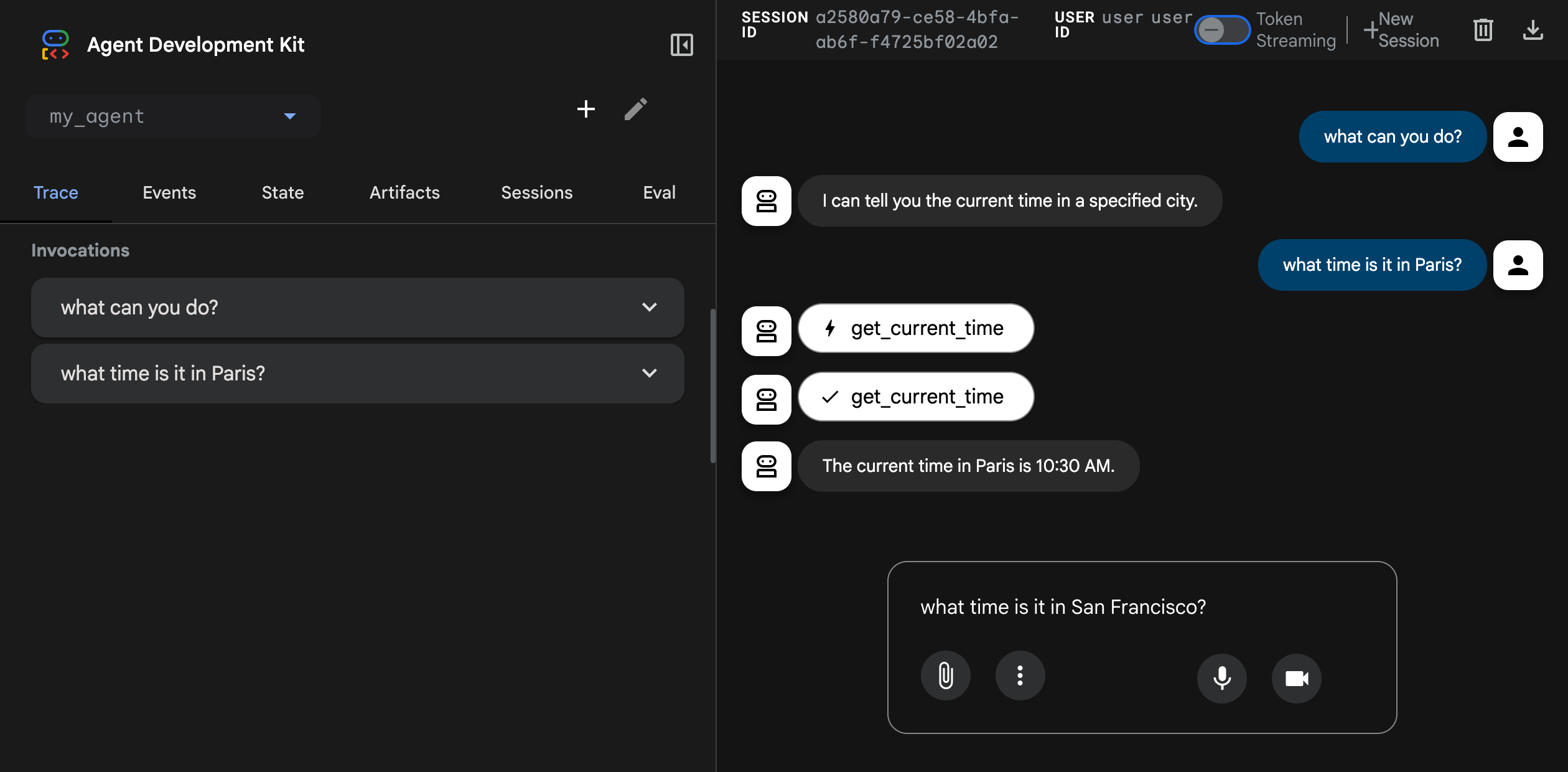
Caution: ADK Web is not meant for use in production deployments. You should use ADK Web for development and debugging purposes only.
Build your agent
Follow the link to Build a multi-tool agent.
Want to run LLMs locally?
You can run LLMs on CPU or GPU locally, using the following tools: