Figure: A sleek, futuristic high-speed train or hyperloop pod arriving at a platform. The platform is clean and modern. With speed lines indicating high performance.
from fastapi import FastAPIapp = FastAPI()@app.get("/items")def get_items():return [1, 2, 3]
The FastAPI class is the main entry point for your application. It inherits from Starlette and acts as the central hub where you:
Register routes using decorators like @app.get(), @app.post(), ..etc.
Configure global settings like exception handlers (404, 500, ..etc.).
Manage lifecycles: events such as: startup and shutdown
2. The Request Class
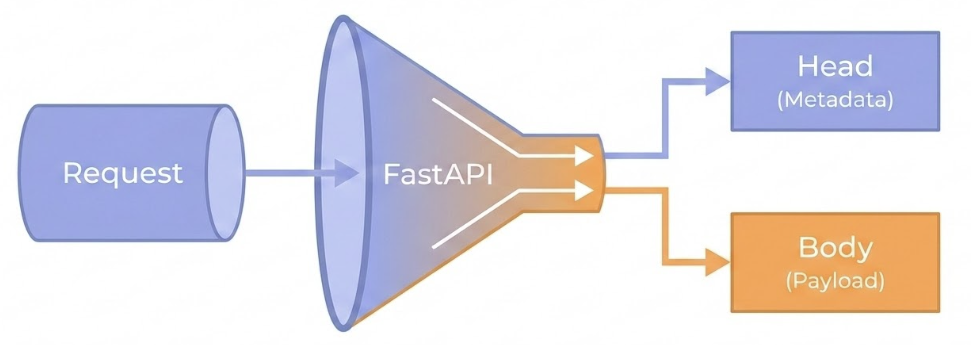
Figure: A diagram showing the flow of an HTTP request. A data packet labeled ‘Request’ enters a funnel labeled ‘FastAPI’. The funnel splits the packet into ‘Head’ (Metadata) and ‘Body’ (Payload).
from fastapi import Request
The Request class provides direct access to the underlying HTTP request. This is useful when you need to access:
from fastapi import Body, Cookie, File, Form, Header, Path, Query
These are the special functions that you can put in path operation function parameters or dependency functions with Annotated to get data from the request.
Path & Query: For values in the URL or query string.
Body, Form, & File: For data, form fields, or files sent in the request payload.
Header & Cookie: For extracting metadata from the request.
4. The Response Class
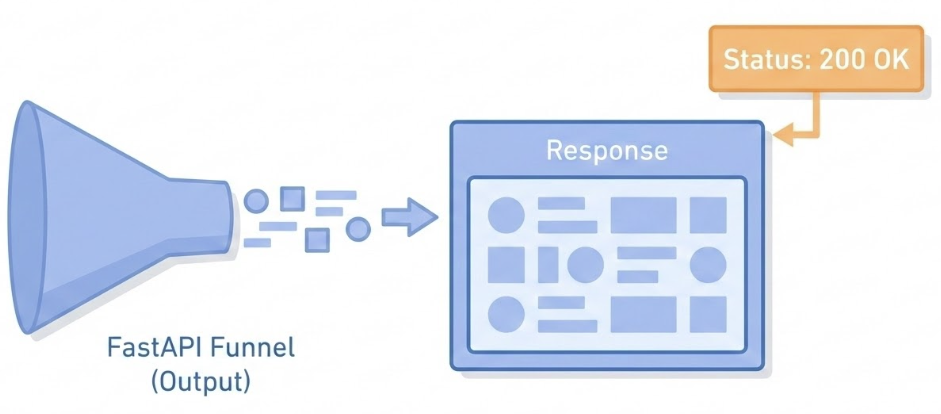
Figure: A diagram showing the output of the FastAPI funnel. Data comes out and is packaged into a box labeled ‘Response’. A label is being attached to the box that says ‘Status: 200 OK’.
from fastapi import Response
You can declare a parameter in a path operation function or dependency to be of type Response and then you can set data for the response like headers or cookies.
Set custom HTTP status codes (e.g., 201 Created).
Add custom headers or set cookies.
Return different types of content, such as JSON, HTML, or plain text.
Host: 0.0.0.0 (Listen on all available IP addresses).
Termination Proxy: Typically runs behind an HTTPS proxy (like Nginx or a Load Balancer).
FastAPI: Standing on Giants
FastAPI is not built from scratch. It creates a powerful synergy by combining two best-in-class libraries:
Starlette: For the web parts.
Pydantic: For the data parts.
Starlette: The Web Engine
Starlette provides the underlying web capabilities:
Asynchronous Core: Built on anyio, allowing for high concurrency (dealing with many users at once).
WebSockets: Native support for real-time bi-directional communication.
Pydantic: The Data Enforcer
Pydantic provides the data validation and serialization:
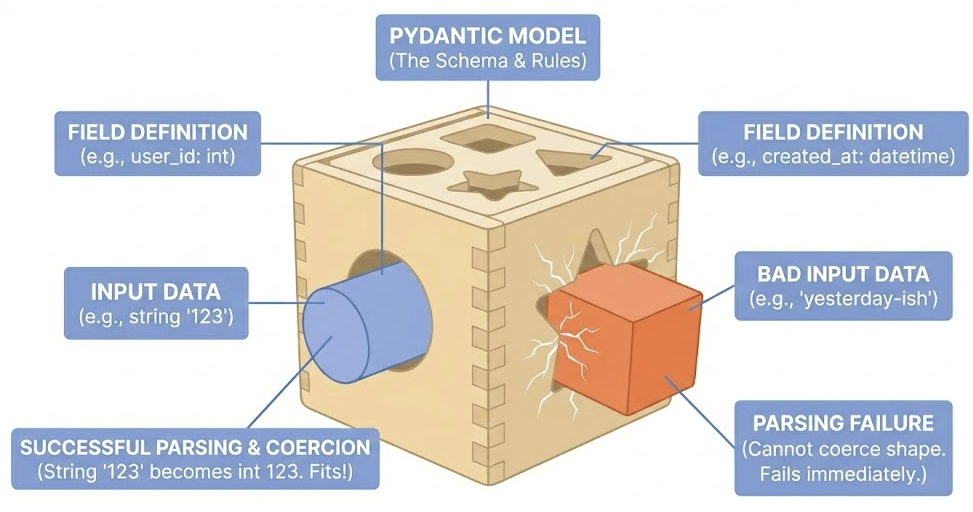
Figure: the BaseModel
Enforces that input data matches your defined types: "123"\(\rightarrow\)123
Written in Rust (v2), making it one of the fastest validators available.
It also draws the map (OpenAPI/Swagger UI) based on your Python code.
Key Takeaways
FastAPI Class: The central hub for routing, configuration, and application lifecycle.
Request & Response: Use Request for raw access to headers/IPs and Response to manually control status codes and cookies.
Modular Routing: APIRouter allows you to split large applications into manageable, logical files.
Dev vs. Prod: fastapi dev enables auto-reload for local iteration; fastapi run optimizes for performance and security in production.
The “Giants”: FastAPI combines Starlette (for high-concurrency async performance) and Pydantic (for strict, automated data validation and documentation).
Session 2: Syntax and Semantics
Decorators: The @ Symbol
A Decorator is a function that takes another function and extends its behavior without explicitly modifying it.
In FastAPI: The @app.get decorator tells FastAPI: “Take the function below (get_items) and register it in the Routing Table for the path /items.”
Type Hints Matter
Type hints are the single definition that drives three separate systems:
Validation & Parsing
Documentation
Auto-completion
Without Types
Manual Parsing:
def create_item(request): data = request.json# 1. Manually check existenceif"price"notin data:return {"error": "Price is required"}, 400# 2. Manually check typeifnotisinstance(data["price"], (int, float)):return {"error": "Price must be a number"}, 400# 3. Manually parse/convert price =float(data["price"])# ... finally business logic ...
With Type Hints
In FastAPI, you declare the type in the function signature. The framework inspects these signatures at runtime.
from fastapi import FastAPIapp = FastAPI()# FastAPI reads 'float' and handles validation/conversion for you@app.post("/items/")asyncdef create_item(price: float):# 'price' is guaranteed to be a float here.return {"price_with_tax": price *1.2}
Complex Data Structures (Pydantic Models)
from pydantic import BaseModelclass Item(BaseModel): name: str price: float tags: list[str] = [] # Optional list of strings@app.post("/items/")asyncdef create_item(item: Item): # FastAPI validates the JSON body against the 'Item' class schemareturn item
Editor Support
The “Invisible” Feature.
Because FastAPI uses standard Python types, your IDE (VS Code, PyCharm) understands the code.
Scenario: You type item. (dot) inside your function.
Result: The editor immediately suggests .name, .price, and .tags because it knows item is of type Item.
Constraints: Field
Pydantic uses Field or specialized types to define further constraints.
from pydantic import Fieldclass User(BaseModel):# Set: {Strings with length between 3 and 10} username: str= Field(min_length=3, max_length=10)
The Annotated
Annotated was introduced (in PEP 593) to allow “tool-specific metadata” to exist alongside types:
from typing import Annotatedfrom pydantic import BaseModel, Fieldclass User(BaseModel):# The 'int' is the type, the 'Field' is the metadata tag age: Annotated[int, Field(gt=18, lt=100)]
For editors and other tools, the type of age is still the first thing: str.
For Pydantic, it knows to enforce additional constraints specified by Field.
Using Type Hints
class Fruit(BaseModel):# Exclusive OR: either 'red' or 'green' color: Literal['red', 'green']# Nested Structure bazam: dict[str, list[tuple[int, bool, float]]]
Custom Parsing Functions
If you wish to customize:
On failure: raise ValueError
On success: return
class User(BaseModel):# Set: {Integers that are even} (Custom Subset) even_id: int@field_validator('even_id')def must_be_even(cls, v):if v %2!=0: raiseValueError("Must be even")return v
Key Takeaways
Blueprints: Use Python classes for automatic validation and parsing.
DX: Type hints enable auto-completion and catch errors early.
Constraints: Use Field and Annotated for precise data rules.
Validation: Use @field_validator for custom business logic.