import osAgents in LangChain
This quickstart takes you from a simple setup to a fully functional AI agent in just a few minutes.
Questions
- What is an Agent in LangChain and how to make one?
- What’s the relationship between an LLM and an Agent?
- What can agents do?
- How do I compare and select the best model for my agent?
- Can I run an agent locally without a provider?
Install dependencies
%pip install -q langchain langchain_openai langchain_communityEnvironment variables
The following environment variables are used in this notebook:
| Variable | Required | Purpose |
|---|---|---|
OPENROUTER_API_KEY |
Yes | Authenticates requests to OpenRouter LLMs |
LANGSMITH_API_KEY |
Optional | Enables LangSmith tracing & dashboard |
LANGSMITH_PROJECT |
Optional | Names the LangSmith project for traces |
LANGSMITH_TRACING_V2 |
Optional | Enables the newer LangSmith tracing mode |
Colab users: Store these as Colab Secrets (key icon in the left sidebar), using the variable names above (for example OPENROUTER_API_KEY). Grant this notebook access to the secrets so they can be read securely at runtime.
Local development: Store these in a .env file in your project directory (which should be listed in .gitignore so it is never committed). The code below uses python-dotenv to load values from this file into environment variables at runtime.
Warning
API Keys are secrets and thus shall never be exposed.
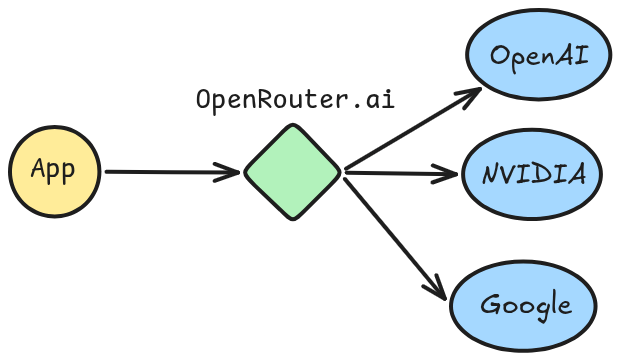
OpenRouter
OpenRouter is the Unified Interface For LLMs.
Key benefits include:
- One API for all models
- no subscription to each provider needed
- switch easily between models and providers by changing a
strvalue
- Some models are free
- Circumvent regional restrictions
If you don’t already have an OpenRouter API key, you can create one for free at: OpenRouter.
How to Set Your API Key?
In Colab, add your API key via Secrets (key icon in the left sidebar). Create a secret named OPENROUTER_API_KEY with your key as the value, then enable notebook access to it.
try:
    # In Colab? read from userdata (secrets)
    from google.colab import userdata
    ON_COLAB = True
    os.environ["OPENROUTER_API_KEY"] = userdata.get("OPENROUTER_API_KEY")
except ImportError:
    pass
LangSmith (Tracing)
Many of the applications you build with LangChain will contain multiple steps with multiple invocations of LLM calls. As these applications get more complex, it becomes crucial to be able to inspect what exactly is going on inside your chain or agent. The best way to do this is with LangSmith.
os.environ["LANGSMITH_PROJECT"] = "my-first-project"
os.environ["LANGSMITH_TRACING_V2"] = "true" # newer V2 tracing protocoltry:
from google.colab import userdata
os.environ["LANGSMITH_API_KEY"] = userdata.get("LANGSMITH_API_KEY")
except ImportError:
passLoad .env file (locally)
from dotenv import load_dotenv

# read from .env file
load_dotenv(override=True)TrueBasic usage
Models can be utilized in two ways:
- With agents - Models can be dynamically specified when creating an agent.
- Standalone - Models can be called directly (outside of the agent loop) for tasks like text generation, classification, or extraction without the need for an agent framework.
Here is a useful how-to for all the things that you can do with chat models, but we’ll show a few highlights below.
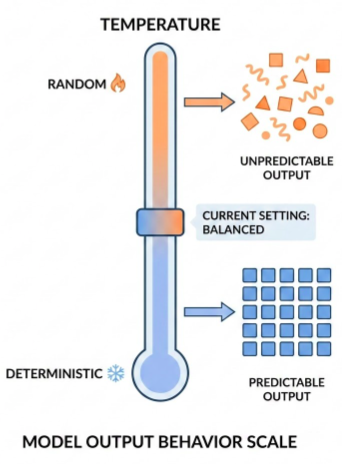
There are a few standard parameters that we can set with chat models. Two of the most common are:
model: the name of the modelmax_tokens: limits the total number of tokens in the response, effectively controlling how long the output can be.temperature: the sampling temperature- Low temperature (close to 0) is more deterministic and focused outputs. This is good for tasks requiring accuracy or factual responses.
- High temperature (close to 1) is good for creative tasks or generating varied responses.
LangChain supports many models via third-party integrations. By default, the course will use ChatOpenAI because it is both popular and performant.
Note: Agents require a model that supports tool calling.
from langchain_openai import ChatOpenAI/home/halgoz/work/ai-agents/content/.venv/lib/python3.12/site-packages/tqdm/auto.py:21: TqdmWarning: IProgress not found. Please update jupyter and ipywidgets. See https://ipywidgets.readthedocs.io/en/stable/user_install.html
from .autonotebook import tqdm as notebook_tqdm# https://openrouter.ai/openai/gpt-5-nano
model_gpt5_nano = ChatOpenAI(
model="openai/gpt-5-nano",
temperature=0,
# OpenRouter instead of the default OpenAI API
base_url="https://openrouter.ai/api/v1",
api_key=os.environ.get("OPENROUTER_API_KEY"),
)Filtering Tool Calling models that are also Free, we select NVIDIA’s Nemotron-3:
# https://openrouter.ai/nvidia/nemotron-3-nano-30b-a3b:free
model_nemotron3_nano = ChatOpenAI(
    model="nvidia/nemotron-3-nano-30b-a3b:free",
    temperature=0,
    # OpenRouter instead of the default OpenAI API
    base_url="https://openrouter.ai/api/v1",
    api_key=os.environ.get("OPENROUTER_API_KEY"),
)
Running a model locally
LangChain supports running models locally on your own hardware. This is useful for scenarios where either data privacy is critical, you want to invoke a custom model, or when you want to avoid the costs incurred when using a cloud-based model.
Ollama is one of the easiest ways to run chat and embedding models locally.
On commodity laptops (for example 16–32 GB RAM machines), good starting points for tool-calling models in Ollama include:
lfm2.5-thinking:1.2b– very lightweight, designed specifically for on-device deployment.granite4:3b(orgranite4:1b/granite4:350m) – strong instruction-following with built-in tool-calling support.ministral-3:3b– edge-optimized vision + text model with native function calling and agentic behavior.
You can always browse the Ollama model catalog and filter by the Tools tag and smaller parameter sizes (≤3B) to find up-to-date options that run well locally.
Key Methods
.invoke(): results are only sent from the server when generation stops.stream(): results are sent from the server as they are being generated.batch(): send multiple inputs at once
1. Invoke
The most straightforward way to call a model is to use invoke() with a single message or a list of messages:
message = model_nemotron3_nano.invoke("what is Ramadan? make it super short").. this returns an AIMessage object:
messagelangchain_core.messages.ai.AIMessage.. which has a content property, which includes the generated response text:
print(message.content)Ramadan is the Islamic holy month during which Muslims fast from sunrise to sunset, focusing on prayer, reflection, and community. It ends with the celebration of Eid al‑Fitr.Messages
Messages are the fundamental unit of context for models in LangChain. They represent the input and output of models, carrying both the content and metadata needed to represent the state of a conversation when interacting with an LLM.
Messages are objects that contain three things:
- Content: Actual model response: text, images, audio, documents, etc.
- Metadata: Optional fields such as response information, message IDs, and token usage
- Role: Identifies the message type. One of:
SystemMessage: Tells the model how to behave and provide context for interactionsHumanMessage: Represents user input and interactions with the modelAIMessage: Responses generated by the model, including text content, tool calls, and metadataToolMessage: Represents the outputs of tool calls
from langchain.messages import (
    SystemMessage,
    HumanMessage,
    AIMessage
)
system_prompt = SystemMessage("You always answer with 10 concise words, no more.")
user_prompt = HumanMessage("How do I make an Agent in Python?")
messages = [
system_prompt,
user_prompt,
]
response = model_nemotron3_nano.invoke(messages)print(response.content)Define class inherit from base implement act sense communicate loopMetadata
An AIMessage can hold token counts and other usage metadata in its usage_metadata field:
response.usage_metadata{'input_tokens': 38,
'output_tokens': 299,
'total_tokens': 337,
'input_token_details': {'audio': 0, 'cache_read': 0},
'output_token_details': {'audio': 0, 'reasoning': 276}}Conversation
A list of messages can be provided to a chat model to represent conversation history. Each message has a role that models use to indicate who sent the message in the conversation.
conversation = [
    SystemMessage("You are a helpful assistant that translates English to Arabic."),
    HumanMessage("Translate: I love programming."),
    AIMessage("أحب البرمجة."),
    HumanMessage("I love building applications.")
]

message = model_nemotron3_nano.invoke(conversation)print(message.content)أحب بناء التطبيقات.2. Streaming and chunks
Most models can stream their output content while it is being generated. By displaying output progressively, streaming significantly improves user experience, particularly for longer responses.
Calling stream() returns an iterator that yields output AIMessageChunk objects as they are produced. You can use a loop to process each chunk in real-time.
chunks = []
for chunk in model_nemotron3_nano.stream("what is Ramadan? keep it short, keep it simple."):
    chunks.append(chunk)
    print(chunk.text, end="", flush=True)
Ramadan is the ninth month of the Islamic lunar calendar. During it, Muslims fast from sunrise to sunset—no food, drink, or other physical needs—while also increasing prayer, charity, and reflection. The month ends with the celebration of Eid al‑Fitr.content='' additional_kwargs={} response_metadata={'model_provider': 'openai'} id='lc_run--019c8ac4-24a9-7243-b435-06c1fabbe92f' tool_calls=[] invalid_tool_calls=[] tool_call_chunks=[]for ch in chunks[50:60]:
print(ch.content) of
the
Islamic
lunar
calendar
.
During
it
,
MuslimsLearn more: Streaming | LangChain.
3. Batch
Batching a collection of independent requests to a model can significantly improve performance and reduce costs, as the processing can be done in parallel:
responses = model_nemotron3_nano.batch([
    "What is the capital of Saudi Arabia?",
    "What is 2 + 8",
    "Is the sky blue or is it our perception? give a short and concise answer"
])

for response in responses:
    print(response)
content='The capital of Saudi Arabia is **Riyadh**.' additional_kwargs={'refusal': None} response_metadata={'token_usage': {'completion_tokens': 38, 'prompt_tokens': 24, 'total_tokens': 62, 'completion_tokens_details': {'accepted_prediction_tokens': None, 'audio_tokens': 0, 'reasoning_tokens': 26, 'rejected_prediction_tokens': None}, 'prompt_tokens_details': {'audio_tokens': 0, 'cached_tokens': 0}, 'cost': 0, 'is_byok': False, 'cost_details': {'upstream_inference_cost': 0, 'upstream_inference_prompt_cost': 0, 'upstream_inference_completions_cost': 0}}, 'model_provider': 'openai', 'model_name': 'nvidia/nemotron-3-nano-30b-a3b:free', 'system_fingerprint': None, 'id': 'gen-1771587230-rws1sKd4yd2Ir45jBE92', 'finish_reason': 'stop', 'logprobs': None} id='lc_run--019c7ad3-dab8-7670-aebf-be1a19d73902-0' tool_calls=[] invalid_tool_calls=[] usage_metadata={'input_tokens': 24, 'output_tokens': 38, 'total_tokens': 62, 'input_token_details': {'audio': 0, 'cache_read': 0}, 'output_token_details': {'audio': 0, 'reasoning': 26}}
content='2\u202f+\u202f8\u202f=\u202f10.' additional_kwargs={'refusal': None} response_metadata={'token_usage': {'completion_tokens': 40, 'prompt_tokens': 23, 'total_tokens': 63, 'completion_tokens_details': {'accepted_prediction_tokens': None, 'audio_tokens': 0, 'reasoning_tokens': 22, 'rejected_prediction_tokens': None}, 'prompt_tokens_details': {'audio_tokens': 0, 'cached_tokens': 0}, 'cost': 0, 'is_byok': False, 'cost_details': {'upstream_inference_cost': 0, 'upstream_inference_prompt_cost': 0, 'upstream_inference_completions_cost': 0}}, 'model_provider': 'openai', 'model_name': 'nvidia/nemotron-3-nano-30b-a3b:free', 'system_fingerprint': None, 'id': 'gen-1771587230-FEcwZ8VMp5p1Qgvgnrqr', 'finish_reason': 'stop', 'logprobs': None} id='lc_run--019c7ad3-daba-76d3-856b-d4204b17db9a-0' tool_calls=[] invalid_tool_calls=[] usage_metadata={'input_tokens': 23, 'output_tokens': 40, 'total_tokens': 63, 'input_token_details': {'audio': 0, 'cache_read': 0}, 'output_token_details': {'audio': 0, 'reasoning': 22}}
content='The sky appears blue because molecules in the atmosphere scatter short‑wavelength (blue) sunlight—an objective physical effect that our visual system interprets as the color blue.' additional_kwargs={'refusal': None} response_metadata={'token_usage': {'completion_tokens': 174, 'prompt_tokens': 32, 'total_tokens': 206, 'completion_tokens_details': {'accepted_prediction_tokens': None, 'audio_tokens': 0, 'reasoning_tokens': 159, 'rejected_prediction_tokens': None}, 'prompt_tokens_details': {'audio_tokens': 0, 'cached_tokens': 0}, 'cost': 0, 'is_byok': False, 'cost_details': {'upstream_inference_cost': 0, 'upstream_inference_prompt_cost': 0, 'upstream_inference_completions_cost': 0}}, 'model_provider': 'openai', 'model_name': 'nvidia/nemotron-3-nano-30b-a3b:free', 'system_fingerprint': None, 'id': 'gen-1771587231-VBn1J8V9CcCv10J2gqBT', 'finish_reason': 'stop', 'logprobs': None} id='lc_run--019c7ad3-dabc-7871-bdd8-f89b2bed8661-0' tool_calls=[] invalid_tool_calls=[] usage_metadata={'input_tokens': 32, 'output_tokens': 174, 'total_tokens': 206, 'input_token_details': {'audio': 0, 'cache_read': 0}, 'output_token_details': {'audio': 0, 'reasoning': 159}}for i, response in enumerate(responses):
print(response.content)
print("="*100)The capital of Saudi Arabia is **Riyadh**.
====================================================================================================
2 + 8 = 10.
====================================================================================================
The sky appears blue because molecules in the atmosphere scatter short‑wavelength (blue) sunlight—an objective physical effect that our visual system interprets as the color blue.
====================================================================================================Structured output
Models can be requested to provide their response in a format matching a given schema. This is useful for ensuring the output can be easily parsed and used in subsequent processing. LangChain supports multiple schema types and methods for enforcing structured output.
Pydantic models provide the richest feature set with field validation, descriptions, and nested structures.
from pydantic import BaseModel, Field

class Movie(BaseModel):
    """A movie with details."""
    title: str = Field(..., description="The title of the movie")
    year: int = Field(..., description="The year the movie was released")
    director: str = Field(..., description="The director of the movie")
    rating: float = Field(..., description="The movie's rating out of 10")
model_with_structure = model_nemotron3_nano.with_structured_output(Movie)
response = model_with_structure.invoke(
"Provide details about the movie Inception"
)print("Title:", response.title)
print("Year:", response.year)
print("Director:", response.director)
print("Rating:", response.rating)Title: Inception
Year: 2010
Director: Christopher Nolan
Rating: 8.8Another example: Refining Search Query
# Schema for structured output
from pydantic import BaseModel, Field


class SearchQuery(BaseModel):
    search_query: str = Field(None, description="Query that is optimized web search.")
    justification: str = Field(
        None, description="Why this query is relevant to the user's request."
    )

# Augment the LLM with schema for structured output
structured_llm = model_nemotron3_nano.with_structured_output(SearchQuery)
# Invoke the augmented LLM
output = structured_llm.invoke(
"How does Calcium CT score relate to high cholesterol?"
)print("search_query:", output.search_query)
print("justification:", output.justification)search_query: Calcium CT score relationship with high cholesterol atherosclerosis risk
justification: The user wants to understand how a coronary artery calcium (CAC) score derived from CT imaging connects to elevated blood cholesterol levels. This requires information on the pathophysiology of atherosclerotic plaque formation, the role of lipid disorders, and how CAC scoring is used clinically to assess cardiovascular risk in the context of cholesterol.Benefits of Structured Output
Models are trained specifically to structure their outputs, because benefits where paramount:
- Cost: the model doesn’t generate extra text.
- Accuracy: you get only what you want; no more, no less.
- Programming: structre can be parsed and used in programs. Example: tool calling.
Learn more: structured responses | LangChain
LLMs and augmentations
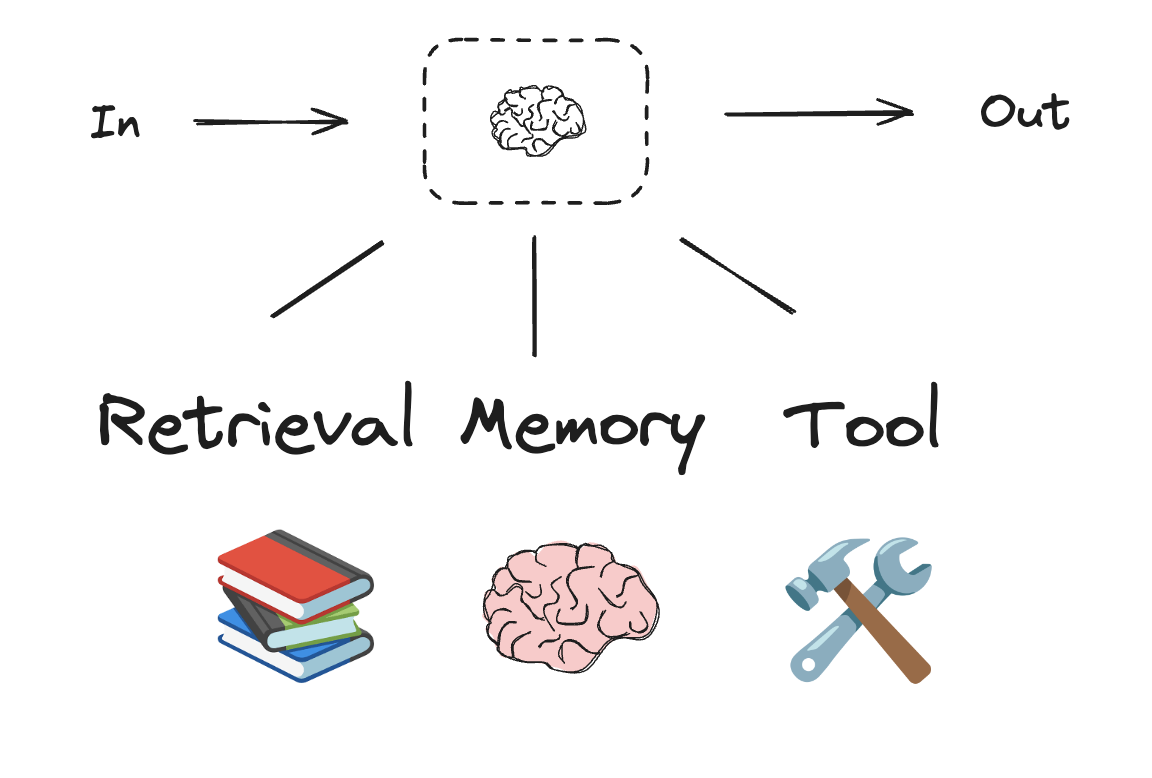
Workflows and agentic systems are based on LLMs and the various augmentations you add to them. Tool calling, structured outputs, and short term memory are a few options for tailoring LLMs to your needs.
Tool calling
Models can request to call tools that perform tasks such as fetching data from a database, searching the web, or running code. Tools are pairings of:
- A schema, including the name of the tool, a description, and/or argument definitions (often a JSON schema)
- A function or coroutine to execute.
Note: A coroutine is a method that can suspend execution and resume at a later time
from langchain.tools import tool

# Define a tool
@tool
def multiply(a: int, b: int) -> int:
    """Multiplies two numbers."""
    return a * b
FAQ: what is the meaning of the @ symbol?
# Bind tools to the model
llm_with_tools = model_nemotron3_nano.bind_tools([multiply])
system_prompt = "You are a helpful assistant that can use tools to perform calculations."
Step 1: Model generates tool calls
question = "What is 2 times 3?"
messages = [
    SystemMessage(system_prompt),
    HumanMessage(question),
]
ai_msg = llm_with_tools.invoke(messages)type(ai_msg)langchain_core.messages.ai.AIMessage# Get the tool call
ai_msg.tool_calls[{'name': 'multiply',
'args': {'a': 2, 'b': 3},
'id': 'call_f60c3d347ce746c29de453f5',
'type': 'tool_call'}]Step 2: Execute tools and collect results
for tool_call in ai_msg.tool_calls:
    # Execute the tool with the generated arguments
    tool_msg = multiply.invoke(tool_call)
messages.append(tool_msg)type(tool_msg)langchain_core.messages.tool.ToolMessagemessages[SystemMessage(content='You are a helpful assistant that can use tools to perform calculations.', additional_kwargs={}, response_metadata={}),
HumanMessage(content='What is 2 times 3?', additional_kwargs={}, response_metadata={}),
ToolMessage(content='6', name='multiply', tool_call_id='call_f60c3d347ce746c29de453f5')]Step 3: Pass results back to model for final response
final_response = model_nemotron3_nano.invoke(messages)print(final_response.text)The result of 2 times 3 is **6**.
This is a basic multiplication fact:
$ 2 \times 3 = 6 $.
Let me know if you'd like further clarification! 😊We’ll say how this multi-step code instructcion is wrapped inside a create_agent function in langchain.
Internet Search Tool
Tavily is a search engine optimized for LLMs and RAG, aimed at efficient, quick, and persistent search results. As mentioned, it’s easy to sign up and offers a generous free tier.
!pip install tavily-pythonSet up Tavily API for web search (Free)
Tavily Search API is a search engine optimized for LLMs and RAG, aimed at efficient, quick, and persistent search results.
You can sign up for an API key here. It’s easy to sign up and offers a very generous free tier. Some lessons (in Module 4) will use Tavily.
Add
TAVILY_API_KEYto Colab Secrets (key icon in the left sidebar).
from google.colab import userdata
from tavily import TavilyClient

tavily_client = TavilyClient(api_key=userdata.get("TAVILY_API_KEY"))
from typing import Literal
def internet_search(
query: str,
max_results: int = 5,
topic: Literal["general", "news", "finance"] = "general",
include_raw_content: bool = False,
):
"""Run a web search"""
return tavily_client.search(
query,
max_results=max_results,
include_raw_content=include_raw_content,
topic=topic,
)result = internet_search("What is LangGraph?", max_results=3)
result{'query': 'What is LangGraph?',
'follow_up_questions': None,
'answer': None,
'images': [],
'results': [{'url': 'https://www.ibm.com/think/topics/langgraph',
'title': 'What is LangGraph? - IBM',
'content': 'LangGraph, created by LangChain, is an open source AI agent framework designed to build, deploy and manage complex generative AI agent workflows. At its core, LangGraph uses the power of graph-based architectures to model and manage the intricate relationships between various components of an AI agent workflow. LangGraph illuminates the processes within an AI workflow, allowing full transparency of the agent’s state. By combining these technologies with a set of APIs and tools, LangGraph provides users with a versatile platform for developing AI solutions and workflows including chatbots, state graphs and other agent-based systems. **Nodes**: In LangGraph, nodes represent individual components or agents within an AI workflow. LangGraph uses enhanced decision-making by modeling complex relationships between nodes, which means it uses AI agents to analyze their past actions and feedback.',
'score': 0.95539,
'raw_content': None},
{'url': 'https://www.datacamp.com/tutorial/langgraph-tutorial',
'title': 'LangGraph Tutorial: What Is LangGraph and How to Use It?',
'content': 'LangGraph is a library within the LangChain ecosystem that provides a framework for defining, coordinating, and executing multiple LLM agents (or chains) in a structured and efficient manner. By managing the flow of data and the sequence of operations, LangGraph allows developers to focus on the high-level logic of their applications rather than the intricacies of agent coordination. Whether you need a chatbot that can handle various types of user requests or a multi-agent system that performs complex tasks, LangGraph provides the tools to build exactly what you need. LangGraph significantly simplifies the development of complex LLM applications by providing a structured framework for managing state and coordinating agent interactions. LangGraph Studio is a visual development environment for LangChain’s LangGraph framework, simplifying the development of complex agentic applications built with LangChain components.',
'score': 0.942385,
'raw_content': None},
{'url': 'https://www.geeksforgeeks.org/machine-learning/what-is-langgraph/',
'title': 'What is LangGraph? - GeeksforGeeks',
'content': 'LangGraph is an open-source framework built by LangChain that streamlines the creation and management of AI agent workflows. At its core, LangGraph combines large language models (LLMs) with graph-based architectures allowing developers to map, organize and optimize how AI agents interact and make decisions. By treating workflows as interconnected nodes and edges, LangGraph offers a scalable, transparent and developer-friendly way to design advanced AI systems ranging from simple chatbots to multi-agent system. The diagram below shows how LangGraph structures its agent-based workflow using distinct tools and stages. By designing workflows, users combine multiple nodes into powerful, dynamic AI processes. * ****langgraph:**** Framework for building graph-based AI workflows. ### Step 6: Build LangGraph Workflow. * Build the workflow graph using LangGraph, adding nodes for classification and response, connecting them with edges and compiling the app. * Send each input through the workflow graph and returns the bot’s response, either a greeting or an AI-powered answer. + Machine Learning Interview Questions and Answers15+ min read.',
'score': 0.9393874,
'raw_content': None}],
'response_time': 0.93,
'request_id': '42d8adb7-c9b7-49b5-afcb-fc4749da5892'}Create an Agent
Agents combine language models with tools to create systems that can reason about tasks, decide which tools to use, and iteratively work towards solutions.
An LLM Agent runs tools in a loop to achieve a goal. An agent runs until a stop condition is met - i.e., when the model emits a final output or an iteration limit is reached.
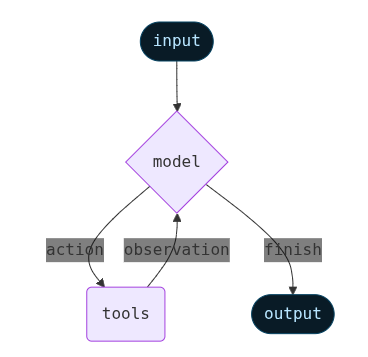
create_agent provides a production-ready agent implementation.
from langchain.agents import create_agent

# System prompt to steer the agent to be an expert researcher
AGENT_PROMPT = """You are an expert researcher. Your job is to conduct thorough research and then write a polished report.

You have access to an internet search tool as your primary means of gathering information.

Keep it short and concise.

## `internet_search`

Use this to run an internet search for a given query. You can specify the max number of results to return, the topic, and whether raw content should be included.
"""

agent = create_agent(
    model=model_nemotron3_nano,
    tools=[internet_search],
    system_prompt=AGENT_PROMPT
)
Invoke the agent
result = agent.invoke({
    "messages": [
        HumanMessage("Explain agentic AI in a tweet")
    ]
})result{'messages': [HumanMessage(content='Explain agentic AI in a tweet', additional_kwargs={}, response_metadata={}, id='eb3b86d8-3111-4646-bd11-7f2b3d24e2cb'),
AIMessage(content='Agentic AI refers to AI systems that can autonomously set goals, plan, and act to achieve them without constant human input—think of AI agents that decide, adapt, and execute tasks like a digital personal assistant on steroids.', additional_kwargs={'refusal': None}, response_metadata={'token_usage': {'completion_tokens': 916, 'prompt_tokens': 456, 'total_tokens': 1372, 'completion_tokens_details': {'accepted_prediction_tokens': None, 'audio_tokens': 0, 'reasoning_tokens': 651, 'rejected_prediction_tokens': None}, 'prompt_tokens_details': {'audio_tokens': 0, 'cached_tokens': 0}, 'cost': 0, 'is_byok': False, 'cost_details': {'upstream_inference_cost': 0, 'upstream_inference_prompt_cost': 0, 'upstream_inference_completions_cost': 0}}, 'model_provider': 'openai', 'model_name': 'nvidia/nemotron-3-nano-30b-a3b:free', 'system_fingerprint': None, 'id': 'gen-1771856080-ALnud8RDRnzK2VkU71XS', 'finish_reason': 'stop', 'logprobs': None}, id='lc_run--019c8ada-2c1c-7260-b40d-69d3d37a726b-0', tool_calls=[], invalid_tool_calls=[], usage_metadata={'input_tokens': 456, 'output_tokens': 916, 'total_tokens': 1372, 'input_token_details': {'audio': 0, 'cache_read': 0}, 'output_token_details': {'audio': 0, 'reasoning': 651}})]}# Print the agent's response
print(result["messages"][-1].content)Agentic AI refers to AI systems that can autonomously set goals, plan, and act to achieve them without constant human input—think of AI agents that decide, adapt, and execute tasks like a digital personal assistant on steroids.Let’s ask about something that needs search:
result = agent.invoke({
    "messages": [
        HumanMessage("What is the difference between LangChain, LangGraph and LangSmith?")
    ]
})result{'messages': [HumanMessage(content='What is the difference between LangChain, LangGraph and LangSmith?', additional_kwargs={}, response_metadata={}, id='7f8c9005-eb8e-4072-86e0-64dd26bec6a6'),
AIMessage(content='', additional_kwargs={'refusal': None}, response_metadata={'token_usage': {'completion_tokens': 123, 'prompt_tokens': 462, 'total_tokens': 585, 'completion_tokens_details': {'accepted_prediction_tokens': None, 'audio_tokens': 0, 'reasoning_tokens': 66, 'rejected_prediction_tokens': None}, 'prompt_tokens_details': {'audio_tokens': 0, 'cached_tokens': 0}, 'cost': 0, 'is_byok': False, 'cost_details': {'upstream_inference_cost': 0, 'upstream_inference_prompt_cost': 0, 'upstream_inference_completions_cost': 0}}, 'model_provider': 'openai', 'model_name': 'nvidia/nemotron-3-nano-30b-a3b:free', 'system_fingerprint': None, 'id': 'gen-1771856086-8OPWhAITZng1xT0GmOTD', 'finish_reason': 'tool_calls', 'logprobs': None}, id='lc_run--019c8ada-45c5-7e13-8c63-b2bdba91d977-0', tool_calls=[{'name': 'internet_search', 'args': {'max_results': 5, 'topic': 'general', 'query': 'LangChain LangGraph LangSmith differences', 'include_raw_content': True}, 'id': 'call_8a3e988aa40842cd95601cea', 'type': 'tool_call'}], invalid_tool_calls=[], usage_metadata={'input_tokens': 462, 'output_tokens': 123, 'total_tokens': 585, 'input_token_details': {'audio': 0, 'cache_read': 0}, 'output_token_details': {'audio': 0, 'reasoning': 66}}),
ToolMessage(content='{"query": "LangChain LangGraph LangSmith differences", "follow_up_questions": null, "answer": null, "images": [], "results": [{"url": "https://dev.to/rajkundalia/langchain-vs-langgraph-vs-langsmith-understanding-the-ecosystem-3m5o", "title": "LangChain vs LangGraph vs LangSmith - DEV Community", "content": "* **LangChain** provides the foundational building blocks for creating LLM applications through modular components and a unified interface for working with different AI providers. * **LangGraph** extends this foundation with **stateful, graph-based orchestration** for complex multi-agent workflows requiring loops, branching, and persistent state. * **LangSmith** completes the picture by offering **observability, tracing, and evaluation** tools for debugging and monitoring LLM applications in production. * **LangGraph** when you need sophisticated state management and agent coordination. What began as simple prompt–response interactions has grown into **multi-step workflows** involving retrieval systems, tool usage, autonomous agents, and long-running processes. LangChain is the **core framework** for building LLM-powered applications. If your application doesn’t need complex branching or shared long-lived state, **LangChain is the right tool**. ## LangGraph: Stateful Agent Orchestration. | LangChain | Composition | Linear workflows, RAG, simple agents |. | LangGraph | Orchestration | Branching, loops, shared state, multi-agent |. LangFlow provides a **visual, drag-and-drop** interface for building LangChain workflows.", "score": 0.918838, "raw_content": " [Skip to content](#main-content)\\n\\n[Log in](https://dev.to/enter?signup_subforem=1) [Create account](https://dev.to/enter?signup_subforem=1&state=new-user)\\n\\n## DEV Community\\n\\n[Raj Kundalia](/rajkundalia)\\n\\nPosted on\\n\\n# LangChain vs LangGraph vs LangSmith: Understanding the Ecosystem\\n\\n[#langchain](/t/langchain) [#langsmith](/t/langsmith) [#langgraph](/t/langgraph)\\n\\n> Building LLM apps isn’t just about prompts anymore. \\n> It’s about **composition**, **orchestration**, and **observability**.\\n\\n---\\n\\n## TL;DR\\n\\n* **LangChain** provides the foundational building blocks for creating LLM applications through modular components and a unified interface for working with different AI providers.\\n* **LangGraph** extends this foundation with **stateful, graph-based orchestration** for complex multi-agent workflows requiring loops, branching, and persistent state.\\n* **LangSmith** completes the picture by offering **observability, tracing, and evaluation** tools for debugging and monitoring LLM applications in production.\\n\\n**Use:**\\n\\n* **LangChain** for straightforward chains and RAG systems\\n* **LangGraph** when you need sophisticated state management and agent coordination\\n* **LangSmith** throughout development and production for visibility into behavior\\n\\n### Hands-on GitHub Repositories\\n\\n* **LangChain RAG Project** → <https://github.com/rajkundalia/langchain-rag-project>\\n* **LangGraph Analyzer** → <https://github.com/rajkundalia/langgraph-analyzer>\\n* **LangSmith Learning** → <https://github.com/rajkundalia/langsmith-learning>\\n\\n---\\n\\n## Introduction\\n\\nThe landscape of LLM application development has evolved rapidly since 2022.\\n\\nWhat began as simple prompt–response interactions has grown into **multi-step workflows** involving retrieval systems, tool usage, autonomous agents, and long-running processes. This evolution introduced **new problems at each stage** of the development lifecycle.\\n\\n* **The composition problem** → How do you connect prompts, models, tools, and data?\\n* **The orchestration problem** → How do you manage branching, retries, loops, and shared state?\\n* **The observability problem** → How do you debug, evaluate, and monitor these systems?\\n\\nThe LangChain ecosystem emerged to address each layer:\\n\\n| Problem | Tool | Year |\\n| --- | --- | --- |\\n| Composition | LangChain | 2022 |\\n| Orchestration | LangGraph | 2024 |\\n| Observability | LangSmith | 2023–2024 |\\n\\nEach tool targets a **specific layer** in the LLM application stack.\\n\\n---\\n\\n## LangChain: The Foundation\\n\\nLangChain is the **core framework** for building LLM-powered applications.\\n\\nIts primary goal is abstraction: different LLM providers expose different APIs, capabilities, and quirks. LangChain hides these differences behind a **unified interface**.\\n\\n### Core Building Blocks\\n\\nLangChain is composed of modular, swappable components:\\n\\n* **Prompts** – Templates and structured inputs for models\\n* **Models** – OpenAI, Anthropic, Google, or local LLMs\\n* **Memory** – Conversation history and contextual state\\n* **Tools** – Function calls to external systems\\n* **Retrievers** – Vector databases and RAG pipelines\\n\\n---\\n\\n### LCEL: LangChain Expression Language\\n\\nWhat ties everything together is **LCEL**.\\n\\nLCEL introduces a **declarative, pipe-based syntax** for composing chains:\\n\\n```\\nprompt | model | output_parser \\n```\\n\\nInstead of writing imperative glue code, you describe **data flow**.\\n\\n### Why LCEL Matters\\n\\nLCEL enables:\\n\\n* Automatic async, streaming, and batch execution\\n* Built-in LangSmith tracing\\n* Parallel execution of independent steps\\n* A unified `Runnable` interface (`invoke`, `batch`, `stream`)\\n\\nThis makes chains **faster**, **cleaner**, and easier to reason about.\\n\\n---\\n\\n### Multi-Provider Support\\n\\nLangChain supports dozens of LLM providers and integrations.\\n\\nYou can switch providers by changing **one line of configuration**, enabling:\\n\\n* Vendor independence\\n* A/B testing across models\\n* Cost and latency optimization\\n\\n---\\n\\n### When LangChain Is Enough\\n\\nUse LangChain when your workflow is primarily:\\n\\n```\\nInput → Process → Output \\n```\\n\\nTypical use cases include:\\n\\n* Chatbots with memory\\n* RAG-based Q&A systems\\n* Natural language → SQL generation\\n* Linear tool pipelines\\n\\nIf your application doesn’t need complex branching or shared long-lived state, **LangChain is the right tool**.\\n\\n## \\n\\n## LangGraph: Stateful Agent Orchestration\\n\\nLangGraph solves the **orchestration problem**.\\n\\nAs soon as your application needs to:\\n\\n* make decisions,\\n* loop,\\n* retry,\\n* or coordinate multiple agents, linear chains start to break down.\\n\\n---\\n\\n### Graph-Based Architecture\\n\\nLangGraph models your application as a **directed graph**:\\n\\n* **Nodes** → processing steps or agents\\n* **Edges** → execution flow between nodes\\n\\nThis enables patterns that are hard or impossible with chains:\\n\\n* Loops and retries\\n* Conditional branching\\n* Parallel execution\\n* Shared, persistent state\\n\\n---\\n\\n### State as a First-Class Concept\\n\\nEvery LangGraph workflow operates on a **shared state object**.\\n\\n* Nodes receive the current state\\n* They compute updates\\n* Updates are merged back into state\\n\\nThis allows multiple agents to collaborate naturally.\\n\\n**Example:**\\n\\n* Research agent gathers sources\\n* Fact-checking agent validates claims\\n* Synthesis agent produces the final answer\\n\\nAll without complex message passing.\\n\\n---\\n\\n### Conditional Routing\\n\\nLangGraph supports **conditional edges**.\\n\\nA function decides which node runs next based on runtime state:\\n\\n* Route customer queries to specialist agents\\n* Loop back when required information is missing\\n* Retry until success conditions are met\\n\\n---\\n\\n### Persistence & Checkpointing\\n\\nLangGraph includes built-in **checkpointing**:\\n\\n* Persist state across restarts\\n* Resume long-running workflows\\n* Support human-in-the-loop pauses\\n* Enable time-travel debugging\\n\\nThis is critical for production-grade agent systems.\\n\\n---\\n\\n### Visualization Support\\n\\nLangGraph workflows are inspectable and exportable:\\n\\n* Mermaid diagrams for documentation\\n* PNG images for presentations\\n* ASCII graphs for terminal debugging\\n\\nThis makes complex agent systems **understandable and communicable**.\\n\\n---\\n\\n### When You Need LangGraph\\n\\nChoose LangGraph when you need:\\n\\n* Explicit shared state\\n* Runtime decision-making\\n* Retry and failure recovery\\n* Multi-agent coordination\\n* Long-running workflows\\n\\nA classic example is an **autonomous research agent** that iteratively searches, reads, verifies, and synthesizes information.\\n\\n## \\n\\n## LangSmith: The Observability Layer\\n\\nLangSmith answers the question:\\n\\n> “What is my LLM application actually doing?”\\n\\nIt doesn’t build workflows — it **illuminates them**.\\n\\n---\\n\\n### Tracing Everything\\n\\nLangSmith captures full execution traces:\\n\\n* Prompts and responses\\n* Token usage and latency\\n* Component call stacks\\n* Errors and retries\\n\\nYou can drill down from:\\n\\n* a full workflow run → to a single LLM call.\\n\\nThis makes debugging *dramatically* easier.\\n\\n---\\n\\n### Evaluation & Regression Testing\\n\\nLangSmith allows you to:\\n\\n* Create evaluation datasets\\n* Run structured tests\\n* Track quality metrics\\n* Compare prompts and models\\n\\nThis enables **regression testing** for LLM apps — a must-have for production systems.\\n\\n---\\n\\n### Production Monitoring\\n\\nIn production, LangSmith tracks:\\n\\n* Response times\\n* Error rates\\n* Token and cost trends\\n* Usage by workflow or user\\n\\nAlerts help you catch issues early and optimize costs.\\n\\n---\\n\\n### Framework-Agnostic\\n\\nWhile LangSmith integrates seamlessly with LangChain and LangGraph, it’s **not limited to them**.\\n\\nYou can instrument *any* LLM application with LangSmith.\\n\\n## \\n\\n## Quick Comparison\\n\\n| Tool | Solves | Use When |\\n| --- | --- | --- |\\n| LangChain | Composition | Linear workflows, RAG, simple agents |\\n| LangGraph | Orchestration | Branching, loops, shared state, multi-agent |\\n| LangSmith | Observability | Debugging, evaluation, production monitoring |\\n\\n## \\n\\n## The Broader Ecosystem\\n\\n### LangFlow\\n\\nLangFlow provides a **visual, drag-and-drop** interface for building LangChain workflows.\\n\\n* Great for prototyping\\n* Helpful for non-technical collaboration\\n* Often exported to code for production\\n\\n---\\n\\n### Model Context Protocol (MCP)\\n\\nMCP (by Anthropic) standardizes **tool and resource access** for LLMs.\\n\\n* Works at the tool/retriever layer\\n* Complements LangChain and LangGraph\\n* Reduces custom integration effort\\n* Framework-agnostic\\n\\nMCP does **not** replace orchestration tools — it enhances connectivity.\\n\\n---\\n\\n## Conclusion\\n\\nThe LangChain ecosystem is **layered, not competitive**.\\n\\n* **LangChain** builds the core logic\\n* **LangGraph** manages complex workflows\\n* **LangSmith** makes everything observable\\n\\nMost serious LLM applications will use **more than one** of these tools.\\n\\nStart simple, add complexity only when needed, and **never ship without observability**.\\n\\n---\\n\\n## Further Reading & Resources\\n\\n* <https://www.datacamp.com/tutorial/langchain-vs-langgraph-vs-langsmith-vs-langflow>\\n* <https://www.datacamp.com/tutorial/langgraph-tutorial>\\n* <https://www.datacamp.com/tutorial/langgraph-agents>\\n* <https://www.techvoot.com/blog/langchain-vs-langgraph-vs-langflow-vs-langsmith-2025>\\n\\n**Video** \\n <https://www.youtube.com/watch?v=vJOGC8QJZJQ>\\n\\n**Academy Finxter Series (Excellent Deep Dive)**\\n\\n* <https://academy.finxter.com/langchain-langsmith-and-langgraph/>\\n* <https://academy.finxter.com/langsmith-and-writing-tools/>\\n* <https://academy.finxter.com/langgraph/>\\n* <https://academy.finxter.com/multi-agent-teams-preparation/>\\n* <https://academy.finxter.com/setting-up-our-multi-agent-team/>\\n* <https://academy.finxter.com/web-research-and-asynchronous-tools/>\\n\\n## Top comments (0)\\n\\nSubscribe\\n\\nFor further actions, you may consider blocking this person and/or [reporting abuse](/report-abuse)\\n\\nWe\'re a place where coders share, stay up-to-date and grow their careers.\\n\\n[Log in](https://dev.to/enter?signup_subforem=1) [Create account](https://dev.to/enter?signup_subforem=1&state=new-user)\\n\\n "}, {"url": "https://medium.com/@anshuman4luv/langchain-vs-langgraph-vs-langflow-vs-langsmith-a-detailed-comparison-74bc0d7ddaa9", "title": "LangChain vs LangGraph vs LangFlow vs LangSmith - Medium", "content": "# LangChain vs LangGraph vs LangFlow vs LangSmith: A Detailed Comparison. In the rapidly evolving world of AI, building applications powered by advanced language models like GPT-4 or Llama 3 has become more accessible, thanks to frameworks like **LangChain**, **LangGraph**, **LangFlow**, and **LangSmith**. LangChain is an open-source framework designed to streamline the development of applications leveraging language models. * **Chains**: Link multiple tasks such as API calls, LLM queries, and data processing. LangGraph builds on LangChain’s capabilities, focusing on orchestrating complex, multi-agent interactions. * **Cyclical Workflows**: Support iterative processes where tasks feed back into earlier stages. Imagine building a task management assistant agent. LangGraph represents this as a graph where each action (e.g., add task, complete task, summarize) is a node. LangGraph’s flexibility allows dynamic routing and revisiting nodes, making it ideal for stateful, interactive systems. LangFlow: Visual Design for LLM Applications. LangSmith is a monitoring and testing tool for LLM applications in production. 2. **Choose LangGraph** for applications involving multiple agents with interdependent tasks.", "score": 0.915091, "raw_content": "[Sitemap](/sitemap/sitemap.xml)\\n\\n[Open in app](https://play.google.com/store/apps/details?id=com.medium.reader&referrer=utm_source%3DmobileNavBar&source=post_page---top_nav_layout_nav-----------------------------------------)\\n\\n[Sign in](/m/signin?operation=login&redirect=https%3A%2F%2Fmedium.com%2F%40anshuman4luv%2Flangchain-vs-langgraph-vs-langflow-vs-langsmith-a-detailed-comparison-74bc0d7ddaa9&source=post_page---top_nav_layout_nav-----------------------global_nav------------------)\\n\\n[Search](/search?source=post_page---top_nav_layout_nav-----------------------------------------)\\n\\n[Sign in](/m/signin?operation=login&redirect=https%3A%2F%2Fmedium.com%2F%40anshuman4luv%2Flangchain-vs-langgraph-vs-langflow-vs-langsmith-a-detailed-comparison-74bc0d7ddaa9&source=post_page---top_nav_layout_nav-----------------------global_nav------------------)\\n\\n# LangChain vs LangGraph vs LangFlow vs LangSmith: A Detailed Comparison\\n\\n[Anshuman](/@anshuman4luv?source=post_page---byline--74bc0d7ddaa9---------------------------------------)\\n\\n3 min read\\n\\n·\\n\\nJan 17, 2025\\n\\n--\\n\\nIn the rapidly evolving world of AI, building applications powered by advanced language models like GPT-4 or Llama 3 has become more accessible, thanks to frameworks like **LangChain**, **LangGraph**, **LangFlow**, and **LangSmith**. While these tools share some similarities, they cater to different aspects of AI application development. This guide provides a clear comparison to help you choose the right tool for your project.\\n\\n## 1. LangChain: The Backbone of LLM Workflows\\n\\nLangChain is an open-source framework designed to streamline the development of applications leveraging language models. It offers modular components to connect various tasks, enabling a seamless development experience.\\n\\n### Key Features:\\n\\n* **LLM Integration**: Compatible with both open-source and closed-source models.\\n* **Prompt Management**: Supports dynamic prompt creation and templating.\\n* **Chains**: Link multiple tasks such as API calls, LLM queries, and data processing.\\n* **Memory**: Store contextual information for personalized, long-term interactions.\\n* **Agents**: Implement decision-making logic for dynamic task execution.\\n* **Data Integration**: Connect external data sources via document loaders and vector databases.\\n\\n### Example Use Case:\\n\\nA customer service chatbot that:\\n\\n1. Uses llm (large language model) to generate responses.\\n2. Dynamically retrieves product information from a database.\\n3. Stores user interactions for continuity in future conversations.\\n\\n## 2. LangGraph: Coordinating Multi-Agent Workflows\\n\\nLangGraph builds on LangChain’s capabilities, focusing on orchestrating complex, multi-agent interactions. It’s particularly useful for applications requiring multiple components to collaborate intelligently.\\n\\n### Key Concepts:\\n\\n* **Nodes and Edges**: Define tasks (nodes) and their relationships (edges) in a graph structure.\\n* **State Management**: Share and update a global state across agents.\\n* **Cyclical Workflows**: Support iterative processes where tasks feed back into earlier stages.\\n\\n### Detailed Example:\\n\\nImagine building a task management assistant agent. The workflow involves processing user inputs to:\\n\\n1. Add tasks.\\n2. Complete tasks.\\n3. Summarize tasks.\\n\\nLangGraph represents this as a graph where each action (e.g., add task, complete task, summarize) is a node. The user input is processed in a central “Process Input” node, which routes the request to the appropriate action node. A **state component** maintains the task list across interactions:\\n\\n* The “Add Task” node adds tasks to the state.\\n* The “Complete Task” node updates the state to mark tasks as done.\\n* The “Summarize” node generates a report using an LLM based on the current state.\\n\\nLangGraph’s flexibility allows dynamic routing and revisiting nodes, making it ideal for stateful, interactive systems.\\n\\n### Ideal Use Case:\\n\\nA research assistant system where:\\n\\n1. One agent retrieves data.\\n2. Another analyzes it.\\n3. A third summarizes the findings.\\n\\nLangGraph’s graph-based architecture ensures smooth coordination and data flow.\\n\\n## 3. LangFlow: Visual Design for LLM Applications\\n\\nLangFlow simplifies the prototyping process by providing a visual, drag-and-drop interface to design and test workflows. It’s ideal for non-developers or teams aiming to rapidly iterate on ideas.\\n\\n### Key Features:\\n\\n* Visual workflow builder.\\n* Pre-configured components for common tasks.\\n* Integration with LangChain’s core functionalities.\\n\\n### Ideal Use Case:\\n\\nA prototype for a document summarization tool where:\\n\\n1. Users upload a document.\\n2. An LLM extracts key points.\\n3. Results are displayed in a user-friendly format.\\n\\nLangFlow allows teams to test workflows without extensive coding.\\n\\n## 4. LangSmith: Ensuring Reliability in Production\\n\\nLangSmith is a monitoring and testing tool for LLM applications in production. It helps developers ensure their systems are efficient, reliable, and cost-effective.\\n\\n### Key Features:\\n\\n* **Performance Metrics**: Track token usage, API latency, and error rates.\\n* **Error Logging**: Identify and debug issues in real-time.\\n* **Cost Optimization**: Monitor resource usage to minimize expenses.\\n\\n### Ideal Use Case:\\n\\nA customer support system handling high volumes of queries. LangSmith provides insights into:\\n\\n1. Token consumption trends.\\n2. Latency spikes during peak hours.\\n3. Error patterns affecting user experience.\\n\\n## Comparison Table\\n\\n## How to Choose the Right Tool\\n\\n1. **Start with LangChain** if your focus is on creating a robust LLM-powered application.\\n2. **Choose LangGraph** for applications involving multiple agents with interdependent tasks.\\n3. **Use LangFlow** for quick prototyping or collaborating with non-technical stakeholders.\\n4. **Implement LangSmith** when scaling applications to production to ensure reliability and cost-efficiency.\\n\\nBy leveraging these tools effectively, you can streamline your AI development process and focus on delivering impactful solutions.\\n\\n[## Written by Anshuman](/@anshuman4luv?source=post_page---post_author_info--74bc0d7ddaa9---------------------------------------)\\n\\n[42 followers](/@anshuman4luv/followers?source=post_page---post_author_info--74bc0d7ddaa9---------------------------------------)\\n\\n·[1 following](/@anshuman4luv/following?source=post_page---post_author_info--74bc0d7ddaa9---------------------------------------)\\n\\n## Responses (2)\\n\\n[Text to speech](https://speechify.com/medium?source=post_page-----74bc0d7ddaa9---------------------------------------)"}, {"url": "https://aws.plainenglish.io/langchain-vs-langgraph-vs-langsmith-vs-langflow-understanding-through-a-realtime-project-2c3efd1606e7", "title": "LangChain vs LangGraph vs LangSmith vs LangFlow", "content": "How They Work Together in One Project · LangChain is the code foundation. · LangGraph is the workflow controller. · LangSmith is the debug and", "score": 0.90432173, "raw_content": null}, {"url": "https://codebasics.io/blog/what-are-the-differences-between-langchain-langgraph-and-langsmith", "title": "LangChain vs LangGraph vs LangSmith: Which One Should You Use?", "content": "6. When Should You Use LangChain, LangGraph, or LangSmith? Whether you\'re designing a chatbot, building a multi-step agentic workflow, or deploying a production-grade AI product—choosing the correct tooling is more important. In this blog post, we deep dive into the three powerful tools LangChain vs LangGraph vs LangSmith which are frequently used together but serve distinctly different purposes. While LangChain and LangGraph help you build apps, LangSmith helps you understand and improve them in production. When Should You Use LangChain, LangGraph, or LangSmith? Choosing between LangChain, LangGraph, and LangSmith depends on your project\'s workflow complexity, debugging needs, and production scale. Watch this YouTube video that clearly explains how LangChain, LangGraph, and LangSmith fit into modern LLM app development. Yes. LangSmith seamlessly integrates with LangChain and LangGraph, providing monitoring and observability for both simple and complex workflows. While LangChain and LangGraph help you build apps, LangSmith is the best tool for observability and prompt evaluation in production.", "score": 0.8958969, "raw_content": "Transform Your Career in 2026 12-Month Gen AI & DS Bootcamp. Live Mentorship, Real Projects, Real Skills. [Explore Program!](https://codebasics.io/genai-bootcamp-3.0)\\n\\n[Explore Program!](https://codebasics.io/genai-bootcamp-3.0)\\n\\n# What Are the Differences Between LangChain, LangGraph, and LangSmith?\\n\\nAI & Data Science\\n\\nAug 04, 2025 | By Codebasics Team\\n\\n### Table of Contents\\n\\n1. Introduction\\n\\n2. What is LangChain\\n\\n2.1 Key Features of the LangChain Framework\\n\\n3. What is LangGraph\\n\\n3.1 When LangGraph Stands Out\\n\\n4. What is LangSmith\\n\\n4.1 Why LangSmith is Essential\\n\\n5. LangChain vs LangGraph vs LangSmith – A Detailed Comparison\\n\\n6. When Should You Use LangChain, LangGraph, or LangSmith?\\n\\n7. Final Thoughts\\n\\n8. FAQs\\n\\n## 1. Introduction\\n\\nAs the development of the [Large Language Model](https://en.wikipedia.org/wiki/Large_language_model) (LLM) matures, developers and product teams are facing more complex challenges in building robust, scalable AI-powered applications. Whether you\'re designing a chatbot, building a multi-step agentic workflow, or deploying a production-grade AI product—choosing the correct tooling is more important.\\n\\nIn this blog post, we deep dive into the three powerful tools LangChain vs LangGraph vs LangSmith which are frequently used together but serve distinctly different purposes. If you’re unsure or wondering how to select the right tool for your project or how they work together then this guide is for you.\\n\\n## 2. What is LangChain?\\n\\n[LangChain](../../resources/langchain-crash-course) is presented as a Python-based framework that simplifies the creation of LLM-powered applications, particularly for straightforward, linear workflows where the LLM performs predefined tasks—such as question-answering, summarization, or document retrieval.\\n\\n### 2.1 Key Features of the LangChain Framework:\\n\\n* **Modularity**: Chains, tools, prompts, and memory are modularized for flexibility.\\n* **Ease of Use**: Ideal for developers building LLM apps with minimal agentic complexity.\\n* **Tool Integration**: Easily connects with APIs, vector stores, databases, and more.\\n* **Best For**: Chatbots, document Q&A, SQL query generation, RAG pipelines.\\n\\n## 3. What is LangGraph?\\n\\nLangGraph is introduced as a more advanced, stateful, graph-based framework built on top of LangChain. It is designed to orchestrate complex, multi-step, stateful agentic workflows that involve autonomous decision-making, retries, and iterative processes, often represented as a graph.\\n\\n### 3.1 When LangGraph Stands Out:\\n\\n* **State Machines**: Constructs workflows as DAGs (Directed Acyclic Graphs).\\n* **Asynchronous Agent Support**: Enables multiple agents to collaborate or loop.\\n* **Advanced Control Flow**: Perfect for situations where you need feedback loops, branching logic, and retries.\\n* **Best For**: AI agents, autonomous systems, iterative planning, complex tools orchestration.\\n\\n## 4. What is LangSmith?\\n\\nLangSmith is a monitoring and debugging platform purpose-built for LLM applications. While LangChain and LangGraph help you build apps, LangSmith helps you understand and improve them in production.\\n\\n### 4.1 Why LangSmith is Essential:\\n\\n* **Tracing and Debugging**: Visualize how prompts, models, and chains interact.\\n* **Evaluation**: Use human or automated grading to test model performance.\\n* **Prompt Experiments**: Run A/B tests to optimize system prompts.\\n* **Best For**: Teams deploying apps at scale who need transparency and version control.\\n\\n## 5. LangChain vs LangGraph vs LangSmith – A Detailed Comparison\\n\\nHere is the detailed comparison of LangChain, LangGraph, and LangSmith:\\n\\n| **Feature** | **LangChain** | **LangGraph** | **LangSmith** |\\n| --- | --- | --- | --- |\\n| **Purpose** | Build linear LLM applications | Handle complex, stateful workflows | Debug, monitor, and evaluate LLM apps |\\n| **Ideal For** | Simple chatbots, Q&A tools | Autonomous agents, iterative workflows | Production-grade observability |\\n| **Control Flow** | Sequential | Graph-based, branching & looping | Not applicable (used for monitoring) |\\n| **Workflow Complexity** | Basic | Advanced | Not Applicable |\\n| **Agent Support** | Basic agent capabilities | Full agent support with state mgmt | Full support for agent monitoring |\\n| **Integration** | Python, JS, APIs, vector DBs | Built on LangChain, supports same | LangChain & LangGraph compatible |\\n| **Deployment Focus** | Prototypes, MVPs | Production agents | Production debugging & evaluation |\\n| **Visualization** | No | Partial (via LangSmith) | Full tracing and logs |\\n| **Evaluation Tools** | None | None | Prompt tests, metrics, user grading |\\n\\n## 6. When Should You Use LangChain, LangGraph, or LangSmith?\\n\\nChoosing between LangChain, LangGraph, and LangSmith depends on your project\'s workflow complexity, debugging needs, and production scale.\\n\\n**Use LangChain if:**\\n\\n* You\'re creating a simple chatbot, summarizing a document, or RAG system.\\n* You prefer simplicity and fast prototyping.\\n* Your use case doesn’t require advanced memory, loops, or retries.\\n\\n**Use LangGraph if:**\\n\\n* You need to create multi-agent, multi-step, or self-correcting workflows.\\n* Your LLM app requires state management and branching logic.\\n* You’re building production-grade agents or autonomous systems.\\n\\n**Use LangSmith if:**\\n\\n* You\'re ready to move to production and need visibility into what your app is doing.\\n* You want to evaluate different prompts, models, or tools.\\n* You\'re managing LLM behavior across teams or projects.\\n\\n[Watch this YouTube video](https://www.youtube.com/watch?v=vJOGC8QJZJQ) that clearly explains how LangChain, LangGraph, and LangSmith fit into modern LLM app development.\\n\\n## 7. Final Thoughts\\n\\nLangChain, LangGraph, and LangSmith aren’t competitors—they\'re complementary. Think of them as a [full-stack toolkit](https://www.geeksforgeeks.org/blogs/full-stack-development-tools/) for modern LLM app development:\\n\\n* LangChain helps you build.\\n* LangGraph helps you orchestrate.\\n* LangSmith helps you optimize.\\n\\nUnderstanding where each tool fits allows you to architect better, debug smarter, and scale faster.\\n\\n*Note: The features and comparisons mentioned are based on the capabilities of LangChain, LangGraph, and LangSmith as of July 2025. These tools are evolving quickly, so we recommend checking their official documentation for the most up-to-date information.*\\n\\n## FAQs\\n\\n**1. Can you use LangSmith with LangChain?** \\nYes. LangSmith seamlessly integrates with LangChain and LangGraph, providing monitoring and observability for both simple and complex workflows.\\n\\n**2. Is LangGraph better than LangChain?** \\nNot necessarily. LangGraph is more powerful for advanced workflows, but LangChain is easier and faster for simple applications. Choose based on your use case.\\n\\n**3. Which is best for production debugging: LangSmith vs others?** \\nLangSmith is purpose-built for debugging and monitoring. While LangChain and LangGraph help you build apps, LangSmith is the best tool for observability and prompt evaluation in production.\\n\\n**4. Can LangChain be used for fine-tuning?** \\nNo, LangChain is not for fine-tuning models. It\'s designed to build LLM applications, but fine-tuning is done using frameworks like Hugging Face or OpenAI\'s API.\\n\\n**5. Should I learn LangGraph instead of LangChain?** \\nLearn LangChain if you need simple, linear workflows like chatbots or Q&A systems. Learn LangGraph if you need more complex workflows with multi-step logic, decision-making, or autonomous agents. Start with LangChain, and move to LangGraph if your projects become more complex.\\n\\n#### Share With Friends\\n\\n[8 Must-Have Skills to Get a Data Analyst Job in 2024](/blog/8-must-have-skills-to-get-a-data-analyst-job) [How to Learn SQL and Python for Data Engineering: A Complete Step-by-Step Guide](/blog/how-to-learn-sql-and-python-for-data-engineering-a-complete-step-by-step-guide)\\n\\nIn Demand\\n\\nUS$291\\n\\n[Gen AI & Data Science Bootcamp 3.0: With Practical Job Placement Support & Virtual Internship](https://codebasics.io/bootcamps/gen-ai-data-science-bootcamp-with-virtual-internship) [Become a high-paying AI-enabled Data Scientist by learning the secrets of the industry taught by data scientist hiring managers with 8+ years of international experience in data industry.](https://codebasics.io/bootcamps/gen-ai-data-science-bootcamp-with-virtual-internship)\\n\\n#### Categories\\n\\n* [Data Analysis](https://codebasics.io/blogs/data-analysis)\\n* [Talent Management](https://codebasics.io/blogs/talent-management)\\n* [AI & Data Science](https://codebasics.io/blogs/ai-data-science66cec6148d22d)\\n* [Data Science](https://codebasics.io/blogs/data-science)\\n* [Deep Learning](https://codebasics.io/blogs/deep-learning)\\n* [Artificial Intelligence](https://codebasics.io/blogs/artificial-intelligence66629f6dc7fb7)\\n* [Python](https://codebasics.io/blogs/python)\\n* [Data Engineering](https://codebasics.io/blogs/data-engineering692ec50b6daa5)\\n* [Machine Learning](https://codebasics.io/blogs/machine-learning669f54cfb1cad)\\n* [Programming](https://codebasics.io/blogs/programming)\\n\\n#### Related Blogs\\n\\nFeb 11, 2026\\n\\n[How Gen AI Will Revolutionize Data Science in 2026](/blog/how-gen-ai-will-revolutionize-data-science-in-2026)\\n\\nMay 27, 2025\\n\\n[What is Agentic AI and How Does it Work?](/blog/what-is-agentic-ai-and-how-does-it-work)\\n\\nMay 20, 2025\\n\\n[How to Start an AI Career in 2025 – Roles & Skills Explained](/blog/how-to-start-an-ai-career-in-2025-roles-skills-explained)\\n\\nMay 08, 2025\\n\\n[Model Context Protocol Explained: Streamlining AI Integration and Development](/blog/model-context-protocol-explained-streamlining-ai-integration-and-development)\\n\\nApr 23, 2025\\n\\n[AI Agents: The Ultimate Productivity Tool Revolutionizing Automation in 2025](/blog/ai-agents-the-ultimate-productivity-tool-revolutionizing-automation-in-2025)\\n\\nLearning knows no limits. Here’s to your journey of seamless learning. Pick your preferred course from the list of paid & free resources.\\n\\nQuick Links\\n\\n* [Courses](https://codebasics.io/courses)\\n* [Blogs](https://codebasics.io/blogs)\\n* [Data Challenges](/challenges/resume-project-challenge)\\n* [Hire Talent](https://codebasics.io/hiring-partners)\\n* [Contact Us](https://codebasics.io/contact-us)\\n\\nHelp & Support\\n\\n* [Refund Policy](https://codebasics.io/refund-policy)\\n* [Terms & Conditions](https://codebasics.io/terms-and-conditions)\\n* [Privacy Policy](https://codebasics.io/privacy-policy)\\n* [Certificate Verification](https://codebasics.io/certificate_validation)\\n* [Business Inquiries](/cdn-cgi/l/email-protection#37175542445e5952444477545853525556445e5444195e58)\\n\\nCourse Topics\\n\\n* [AI & Data Science](https://codebasics.io/categories/data-science)\\n* [Exploratory Data Analysis (EDA)](https://codebasics.io/categories/exploratory-data-analysis-eda)\\n* [Career Advice](https://codebasics.io/categories/career-advice)\\n* [Conversations](https://codebasics.io/categories/conversations)\\n* [Data Analysis](https://codebasics.io/categories/data-analysis)\\n\\n* [Deep Learning](https://codebasics.io/categories/deep-learning)\\n* [Julia](https://codebasics.io/categories/julia)\\n* [Jupyter Notebook](https://codebasics.io/categories/jupyter-notebook)\\n* [Machine Learning](https://codebasics.io/categories/machine-learning)\\n* [Matplotlib](https://codebasics.io/categories/matplotlib)\\n\\n© 2026 [Codebasics](https://codebasics.io). Owned and operated by LearnerX EdTech Private Limited. \\n Technology partner: [AtliQ Technologies](https://www.atliq.com/)\\n\\n##### Login\\n\\n[Log in with Google](https://codebasics.io/google)\\n\\n[Log in with Linkedin](https://codebasics.io/linkedin)\\n\\nDon\'t have an account? [Register Now!](https://codebasics.io/register)\\n\\nBy signing up, you agree to \\n our [Terms and Conditions](https://codebasics.io/terms-and-conditions) and [Privacy Policy](https://codebasics.io/privacy-policy).\\n\\n[Talk to us](https://forms.office.com/r/0d6zvJeYa1 \\"Talk to us\\") [Chat with us](https://wa.me/918977530886?text=Hi%20Codebasics!\\n\\n \\"Chat with us\\")\\n\\n "}, {"url": "https://www.reddit.com/r/Rag/comments/1mxs81z/finally_figured_out_the_langchain_vs_langgraph_vs/", "title": "Finally figured out the LangChain vs LangGraph vs LangSmith ...", "content": "# Finally figured out the LangChain vs LangGraph vs LangSmith confusion - here\'s what I learned. After weeks of being confused about when to use LangChain, LangGraph, or LangSmith (and honestly making some poor choices), I decided to dive deep and create a breakdown. The TLDR: They\'re not competitors - they\'re actually designed to work together, but each serves a very specific purpose that most tutorials don\'t explain clearly. 🔗 Full breakdown: LangSmith vs LangChain vs LangGraph The REAL Difference for Developers. The game-changer for me was understanding that you can (and often should) use them together. LangChain for the basics, LangGraph for complex flows, LangSmith to see what\'s actually happening under the hood. Anyone else been through this confusion? What\'s your go-to setup for production LLM apps? Would love to hear how others are structuring their GenAI projects - especially if you\'ve found better alternatives or have war stories about debugging LLM applications 😅.", "score": 0.8923472, "raw_content": " \\n\\n \\n \\n \\n\\n[Go to Rag](/r/Rag/) \\n\\n[r/Rag](/r/Rag/) •\\n\\n# Finally figured out the LangChain vs LangGraph vs LangSmith confusion - here\'s what I learned\\n\\nAfter weeks of being confused about when to use LangChain, LangGraph, or LangSmith (and honestly making some poor choices), I decided to dive deep and create a breakdown.\\n\\nThe TLDR: They\'re not competitors - they\'re actually designed to work together, but each serves a very specific purpose that most tutorials don\'t explain clearly.\\n\\n🔗 Full breakdown: [LangSmith vs LangChain vs LangGraph The REAL Difference for Developers](https://www.youtube.com/watch?v=DGxf0X1GdtQ)\\n\\nThe game-changer for me was understanding that you can (and often should) use them together. LangChain for the basics, LangGraph for complex flows, LangSmith to see what\'s actually happening under the hood.\\n\\nAnyone else been through this confusion? What\'s your go-to setup for production LLM apps?\\n\\nWould love to hear how others are structuring their GenAI projects - especially if you\'ve found better alternatives or have war stories about debugging LLM applications 😅\\n\\n \\n\\n[Reddit Rules](https://www.redditinc.com/policies/content-policy) [Privacy Policy](https://www.reddit.com/policies/privacy-policy) [User Agreement](https://www.redditinc.com/policies/user-agreement) [Your Privacy Choices](https://support.reddithelp.com/hc/articles/43980704794004) [Accessibility](https://support.reddithelp.com/hc/sections/38303584022676-Accessibility) [Reddit, Inc. © 2026. All rights reserved.](https://redditinc.com)\\n\\n "}], "response_time": 5.43, "request_id": "54b07b6b-5d65-42aa-83ab-1694988b125d"}', name='internet_search', id='0380801e-3706-41ee-adad-e4593fbb87a6', tool_call_id='call_8a3e988aa40842cd95601cea'),
AIMessage(content='**LangChain\u202fvs\u202fLangGraph\u202fvs\u202fLangSmith – What They Do and When to Use Them**\n\n| Aspect | **LangChain** | **LangGraph** | **LangSmith** |\n|--------|---------------|---------------|---------------|\n| **Primary Goal** | Provide a **modular toolbox** for building LLM‑powered apps (prompts, models, memory, tools, RAG, etc.). | Add **stateful, graph‑based orchestration** for complex, multi‑step workflows that need branching, loops, retries, and shared state. | Offer **observability, tracing, evaluation, and monitoring** for any LLM application (especially those built with LangChain/LangGraph). |\n| **Core Concept** | **Chains** – linear pipelines of components (`prompt → model → parser`). | **Graphs** – nodes (steps/agents) and edges (control flow) that can loop, branch, and retain a mutable state. | **Traces** – full execution logs that let you drill from a workflow run down to a single LLM call, plus evaluation & metrics. |\n| **Typical Use‑Cases** | • Simple chatbots, Q&A, RAG pipelines<br>• Linear tool usage (e.g., fetch‑then‑summarize)<br>• Prototyping & MVPs | • Multi‑agent systems<br>• Workflows with feedback loops, retries, or conditional routing<br>• Long‑running processes that need persistent state | • Debugging production pipelines<br>• A/B‑testing prompts/models<br>• Monitoring latency, cost, error rates<br>• Regression testing of LLM behavior |\n| **When to Choose It** | Your app fits a **straight‑through** flow and does not need complex state or branching. | You need **shared state, dynamic routing, or multi‑agent coordination** (e.g., research assistants, autonomous planners). | You are moving to **production** and need visibility, debugging, and evaluation capabilities. |\n| **Integration** | Works with any LLM provider via a unified interface. | Built on top of LangChain; can be used alongside it. | Agnostic – can instrument LangChain, LangGraph, or any custom LLM code. |\n| **Key Benefits** | • Rapid prototyping<br>• Vendor‑agnostic model switching<br>• Built‑in async/streaming via LCEL | • Explicit state management<br>• Conditional edges & loops<br>• Persistence & checkpointing for long‑running agents | • End‑to‑end tracing<br>• Prompt & model evaluation tools<br>• Production‑grade monitoring & alerting |\n\n### TL;DR Summary\n- **LangChain** = *building blocks* for basic LLM apps. \n- **LangGraph** = *orchestrator* for sophisticated, stateful, multi‑agent workflows. \n- **LangSmith** = *debugger & observability layer* that makes those apps production‑ready.\n\nIn practice, a typical production stack uses **all three together**: build with LangChain, orchestrate complex flows with LangGraph, and monitor/evaluate everything with LangSmith.', additional_kwargs={'refusal': None}, response_metadata={'token_usage': {'completion_tokens': 722, 'prompt_tokens': 9878, 'total_tokens': 10600, 'completion_tokens_details': {'accepted_prediction_tokens': None, 'audio_tokens': 0, 'reasoning_tokens': 67, 'rejected_prediction_tokens': None}, 'prompt_tokens_details': {'audio_tokens': 0, 'cached_tokens': 0}, 'cost': 0, 'is_byok': False, 'cost_details': {'upstream_inference_cost': 0, 'upstream_inference_prompt_cost': 0, 'upstream_inference_completions_cost': 0}}, 'model_provider': 'openai', 'model_name': 'nvidia/nemotron-3-nano-30b-a3b:free', 'system_fingerprint': None, 'id': 'gen-1771856094-Dwpy8GjlZFprVUGX6Yh0', 'finish_reason': 'stop', 'logprobs': None}, id='lc_run--019c8ada-64de-7c50-b22f-0d0678c3c586-0', tool_calls=[], invalid_tool_calls=[], usage_metadata={'input_tokens': 9878, 'output_tokens': 722, 'total_tokens': 10600, 'input_token_details': {'audio': 0, 'cache_read': 0}, 'output_token_details': {'audio': 0, 'reasoning': 67}})]}type(result["messages"][-2])langchain_core.messages.tool.ToolMessage# Print the agent's response
print(result["messages"][-1].content)**LangChain vs LangGraph vs LangSmith – What They Do and When to Use Them**
| Aspect | **LangChain** | **LangGraph** | **LangSmith** |
|--------|---------------|---------------|---------------|
| **Primary Goal** | Provide a **modular toolbox** for building LLM‑powered apps (prompts, models, memory, tools, RAG, etc.). | Add **stateful, graph‑based orchestration** for complex, multi‑step workflows that need branching, loops, retries, and shared state. | Offer **observability, tracing, evaluation, and monitoring** for any LLM application (especially those built with LangChain/LangGraph). |
| **Core Concept** | **Chains** – linear pipelines of components (`prompt → model → parser`). | **Graphs** – nodes (steps/agents) and edges (control flow) that can loop, branch, and retain a mutable state. | **Traces** – full execution logs that let you drill from a workflow run down to a single LLM call, plus evaluation & metrics. |
| **Typical Use‑Cases** | • Simple chatbots, Q&A, RAG pipelines<br>• Linear tool usage (e.g., fetch‑then‑summarize)<br>• Prototyping & MVPs | • Multi‑agent systems<br>• Workflows with feedback loops, retries, or conditional routing<br>• Long‑running processes that need persistent state | • Debugging production pipelines<br>• A/B‑testing prompts/models<br>• Monitoring latency, cost, error rates<br>• Regression testing of LLM behavior |
| **When to Choose It** | Your app fits a **straight‑through** flow and does not need complex state or branching. | You need **shared state, dynamic routing, or multi‑agent coordination** (e.g., research assistants, autonomous planners). | You are moving to **production** and need visibility, debugging, and evaluation capabilities. |
| **Integration** | Works with any LLM provider via a unified interface. | Built on top of LangChain; can be used alongside it. | Agnostic – can instrument LangChain, LangGraph, or any custom LLM code. |
| **Key Benefits** | • Rapid prototyping<br>• Vendor‑agnostic model switching<br>• Built‑in async/streaming via LCEL | • Explicit state management<br>• Conditional edges & loops<br>• Persistence & checkpointing for long‑running agents | • End‑to‑end tracing<br>• Prompt & model evaluation tools<br>• Production‑grade monitoring & alerting |
### TL;DR Summary
- **LangChain** = *building blocks* for basic LLM apps.
- **LangGraph** = *orchestrator* for sophisticated, stateful, multi‑agent workflows.
- **LangSmith** = *debugger & observability layer* that makes those apps production‑ready.
In practice, a typical production stack uses **all three together**: build with LangChain, orchestrate complex flows with LangGraph, and monitor/evaluate everything with LangSmith.Key Takeaways
- Three key methods for models: invoke, stream, and batch.
- LLMs can be configured to responsd in a structured format
- Agent = Model + Tools
- Models (LLMs) are the brain-power of agents
- Tools connect the LLM to the outside world.