import os
from google.colab import userdata

# We use OpenRouter for the agent — add OPENROUTER_API_KEY to Colab Secrets (key icon in left sidebar)
# Get your key at https://openrouter.ai/keys
os.environ["OPENROUTER_API_KEY"] = userdata.get("OPENROUTER_API_KEY")Build a personal assistant with subagents
Overview
The supervisor pattern is a multi-agent architecture where a central supervisor agent coordinates specialized worker agents. This approach excels when tasks require different types of expertise. Rather than building one agent that manages tool selection across domains, you create focused specialists coordinated by a supervisor who understands the overall workflow.
In this tutorial, you’ll build a personal assistant system that demonstrates these benefits through a realistic workflow. The system will coordinate two specialists with fundamentally different responsibilities:
- A calendar agent that handles scheduling, availability checking, and event management.
- An email agent that manages communication, drafts messages, and sends notifications.
Why use a supervisor?
Multi-agent architectures allow you to partition tools across workers, each with their own individual prompts or instructions. Consider an agent with direct access to all calendar and email APIs: it must choose from many similar tools, understand exact formats for each API, and handle multiple domains simultaneously. If performance degrades, it may be helpful to separate related tools and associated prompts into logical groups (in part to manage iterative improvements).
Understanding the architecture
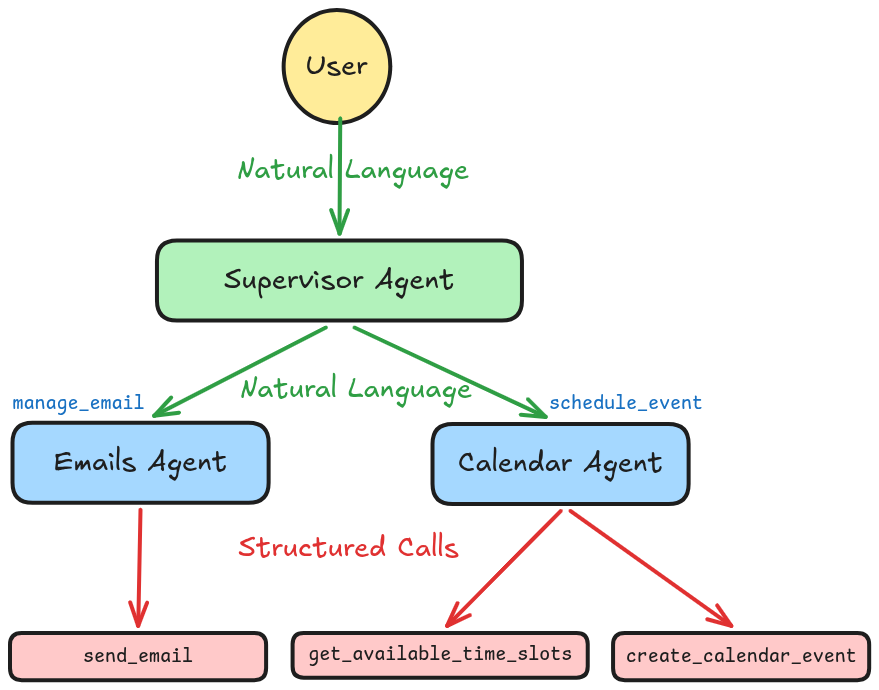
Your system has three layers. The bottom layer contains rigid API tools that require exact formats. The middle layer contains sub-agents that accept natural language, translate it to structured API calls, and return natural language confirmations. The top layer contains the supervisor that routes to high-level capabilities and synthesizes results.
This separation of concerns provides several benefits: each layer has a focused responsibility, you can add new domains without affecting existing ones, and you can test and iterate on each layer independently.
Components
We will need to select a chat model from LangChain’s suite of integrations:
Select a chat model
👉 Read the OpenAI chat model integration docs
!pip install "langchain[openai]"from langchain_openai import ChatOpenAI
# https://openrouter.ai/nvidia/nemotron-3-nano-30b-a3b:free
model_nemotron3_nano = ChatOpenAI(
model="nvidia/nemotron-3-nano-30b-a3b:free",
temperature=0,
base_url="https://openrouter.ai/api/v1",
api_key=os.environ.get("OPENROUTER_API_KEY"),
)/home/halgoz/work/ai-agents/content/.venv/lib/python3.12/site-packages/tqdm/auto.py:21: TqdmWarning: IProgress not found. Please update jupyter and ipywidgets. See https://ipywidgets.readthedocs.io/en/stable/user_install.html
from .autonotebook import tqdm as notebook_tqdm1. Define tools
- Start by defining the tools that require structured inputs.
- In real applications, these would call actual APIs (Google Calendar, SendGrid, etc.).
- For this tutorial, you’ll use stubs to demonstrate the pattern.
from langchain.tools import tool@tool
def create_calendar_event(
title: str,
start_time: str, # ISO format: "2024-01-15T14:00:00"
end_time: str, # ISO format: "2024-01-15T15:00:00"
attendees: list[str], # email addresses
location: str = ""
) -> str:
"""Create a calendar event. Requires exact ISO datetime format."""
# Stub: In practice, this would call Google Calendar API, Outlook API, etc.
return f"Event created: {title} from {start_time} to {end_time} with {len(attendees)} attendees"@tool
def send_email(
to: list[str], # email addresses
subject: str,
body: str,
cc: list[str] = []
) -> str:
"""Send an email via email API. Requires properly formatted addresses."""
# Stub: In practice, this would call SendGrid, Gmail API, etc.
return f"Email sent to {', '.join(to)} - Subject: {subject}"@tool
def get_available_time_slots(
attendees: list[str],
date: str, # ISO format: "2024-01-15"
duration_minutes: int
) -> list[str]:
"""Check calendar availability for given attendees on a specific date."""
# Stub: In practice, this would query calendar APIs
return ["09:00", "14:00", "16:00"]2. Create specialized sub-agents
Next, we’ll create specialized sub-agents that handle each domain.
Create a calendar agent
- The calendar agent understands natural language scheduling requests and translates them into precise API calls.
- It handles date parsing, availability checking, and event creation.
from langchain.agents import create_agent

CALENDAR_AGENT_PROMPT = (
    "You are a calendar scheduling assistant. "
    "Parse natural language scheduling requests (e.g., 'next Tuesday at 2pm') "
    "into proper ISO datetime formats. "
    "Use get_available_time_slots to check availability when needed. "
    "Use create_calendar_event to schedule events. "
    "Always confirm what was scheduled in your final response."
)

calendar_agent = create_agent(
    model=model_nemotron3_nano,
    tools=[
        create_calendar_event,
        get_available_time_slots
    ],
    system_prompt=CALENDAR_AGENT_PROMPT,
)
Test the calendar agent to see how it handles natural language scheduling:
from langchain.messages import HumanMessagequery = "Schedule a team meeting next Tuesday at 2pm for 1 hour"
result1 = calendar_agent.invoke({"messages": [HumanMessage(query)]})
for message in result1.get("messages", []):
message.pretty_print()================================ Human Message ================================= Schedule a team meeting next Tuesday at 2pm for 1 hour ================================== Ai Message ================================== Tool Calls: get_available_time_slots (call_fd81d0bf4ae4495ba4ab1568) Call ID: call_fd81d0bf4ae4495ba4ab1568 Args: attendees: [] duration_minutes: 60 date: 2024-05-21 ================================= Tool Message ================================= Name: get_available_time_slots ["09:00", "14:00", "16:00"] ================================== Ai Message ================================== Tool Calls: create_calendar_event (call_f9f71d9e2d8a481da00615cd) Call ID: call_f9f71d9e2d8a481da00615cd Args: end_time: 2024-05-21T15:00:00 attendees: [] start_time: 2024-05-21T14:00:00 title: Team Meeting ================================= Tool Message ================================= Name: create_calendar_event Event created: Team Meeting from 2024-05-21T14:00:00 to 2024-05-21T15:00:00 with 0 attendees ================================== Ai Message ================================== Your team meeting has been scheduled for **next Tuesday, May 21, 2024**, from **2:00 PM to 3:00 PM**. The event titled “Team Meeting” has been created in your calendar. Let me know if you’d like to add any attendees, a location, or any other details!
The agent parses “next Tuesday at 2pm” into ISO format (“2024-01-16T14:00:00”), calculates the end time, calls create_calendar_event, and returns a natural language confirmation.
Create an email agent
- The email agent handles message composition and sending.
- It focuses on extracting recipient information, crafting appropriate subject lines and body text, and managing email communication.
EMAIL_AGENT_PROMPT = (
    "You are an email assistant. "
    "Compose professional emails based on natural language requests. "
    "Extract recipient information and craft appropriate subject lines and body text. "
    "Use send_email to send the message. "
    "Always confirm what was sent in your final response."
)

email_agent = create_agent(
    model=model_nemotron3_nano,
    tools=[send_email],
    system_prompt=EMAIL_AGENT_PROMPT,
)
Test the email agent with a natural language request:
query = "Send the design team a reminder about reviewing the new mockups"
result2 = email_agent.invoke({"messages": [HumanMessage(query)]})
for message in result2.get("messages", []):
    message.pretty_print()
================================ Human Message ================================= Send the design team a reminder about reviewing the new mockups ================================== Ai Message ================================== Tool Calls: send_email (call_13aa1283a4744689b95860ca) Call ID: call_13aa1283a4744689b95860ca Args: body: Hi Design Team, Please review the new mockups and share your feedback by EOD tomorrow. Let me know if you have any questions. Thanks! subject: Reminder: Review New Mockups to: ['design-team@company.com'] ================================= Tool Message ================================= Name: send_email Email sent to design-team@company.com - Subject: Reminder: Review New Mockups ================================== Ai Message ================================== The reminder email has been sent to the design team. - **Recipient:** design-team@company.com - **Subject:** Reminder: Review New Mockups - **Body:**Hi Design Team,
Please review the new mockups and share your feedback by EOD tomorrow. Let me know if you have any questions.
Thanks!
Let me know if there’s anything else you’d like to do! </pre>
- The agent infers the recipient from the informal request, crafts a professional subject line and body, calls
send_email, and returns a confirmation. - Each sub-agent has a narrow focus with domain-specific tools and prompts, allowing it to excel at its specific task.
3. Wrap sub-agents as tools
- Now wrap each sub-agent as a tool that the supervisor can invoke.
- This is the key architectural step that creates the layered system.
- The supervisor will see high-level tools like
"schedule_event", not low-level tools like"create_calendar_event".
@tool
def schedule_event(request: str) -> str:
    """Schedule calendar events using natural language.

    Use this when the user wants to create, modify, or check calendar appointments.
    Handles date/time parsing, availability checking, and event creation.

    Input: Natural language scheduling request (e.g., 'meeting with design team
    next Tuesday at 2pm')
    """
    result = calendar_agent.invoke({"messages": [HumanMessage(request)]})
    return result["messages"][-1].text
@tool
def manage_email(request: str) -> str:
"""Send emails using natural language.
Use this when the user wants to send notifications, reminders, or any email
communication. Handles recipient extraction, subject generation, and email
composition.
Input: Natural language email request (e.g., 'send them a reminder about
the meeting')
"""
result = email_agent.invoke({"messages": [HumanMessage(request)]})
return result["messages"][-1].text- The tool descriptions (docstring) help the supervisor decide when to use each tool, so make them clear and specific.
- We return only the sub-agent’s final response, as the supervisor doesn’t need to see intermediate reasoning or tool calls.
4. Create the supervisor agent
- Now create the supervisor that orchestrates the sub-agents.
- The supervisor only sees high-level tools and makes routing decisions at the domain level, not the individual API level.
SUPERVISOR_PROMPT = (
    "You are a helpful personal assistant. "
    "You can schedule calendar events and send emails. "
    "Break down user requests into appropriate tool calls and coordinate the results. "
    "When a request involves multiple actions, use multiple tools in sequence."
)

supervisor_agent = create_agent(
    model=model_nemotron3_nano,
    tools=[
        schedule_event,
        manage_email
    ],
    system_prompt=SUPERVISOR_PROMPT,
)
5. Use the supervisor
Now test your complete system with complex requests that require coordination across multiple domains:
Example 1: Simple single-domain request
query = "Schedule a team standup for tomorrow at 9am"
result3 = supervisor_agent.invoke({"messages": [HumanMessage(query)]})
for message in result3.get("messages", []):
    message.pretty_print()
================================ Human Message ================================= Schedule a team standup for tomorrow at 9am ================================== Ai Message ================================== Tool Calls: schedule_event (call_45ce88b1ec224cdf9a3ae261) Call ID: call_45ce88b1ec224cdf9a3ae261 Args: request: Schedule a team standup for tomorrow at 9am ================================= Tool Message ================================= Name: schedule_event Your team standup has been scheduled: - **Title:** Team Standup - **Date & Time:** Tomorrow (2024‑05‑16) from 9:00 AM to 9:30 AM - **Attendees:** Team Members Let me know if you need any changes or additional details! ================================== Ai Message ================================== Your team standup has been scheduled: - **Title:** Team Standup - **Date & Time:** Tomorrow (2024‑05‑16) from 9:00 AM to 9:30 AM - **Attendees:** Team Members Let me know if you’d like to add a location, adjust the duration, or invite specific people!
The supervisor identifies this as a calendar task, calls schedule_event, and the calendar agent handles date parsing and event creation.
Tip
For full transparency into the information flow, including prompts and responses for each chat model call, check out the LangSmith trace for the above run.
Example 2: Complex multi-domain request
query = (
    "Schedule a meeting with the design team next Tuesday at 2pm for 1 hour, "
    "and send them an email reminder about reviewing the new mockups."
)
result4 = supervisor_agent.invoke({"messages": [HumanMessage(query)]})
for message in result4.get("messages", []):
    message.pretty_print()
================================ Human Message ================================= Schedule a meeting with the design team next Tuesday at 2pm for 1 hour, and send them an email reminder about reviewing the new mockups. ================================== Ai Message ================================== Tool Calls: schedule_event (call_465cd823228b4edd9d98552c) Call ID: call_465cd823228b4edd9d98552c Args: request: meeting with design team next Tuesday at 2pm for 1 hour ================================= Tool Message ================================= Name: schedule_event Your meeting with the design team is scheduled for **Tuesday, May 21, 2024, from 2:00 PM to 3:00 PM**. Let me know if you’d like to add a location, agenda, or any other details! ================================== Ai Message ================================== Tool Calls: manage_email (call_16a12e387b314d8498f40c29) Call ID: call_16a12e387b314d8498f40c29 Args: request: send an email reminder to the design team about reviewing the new mockups ================================= Tool Message ================================= Name: manage_email The email reminder has been sent to **design-team@example.com** with the subject **“Reminder: Review New Mockups.”** The message prompted the design team to review the new mockups and provide feedback by the end of the day tomorrow. Let me know if there’s anything else you’d like to do! ================================== Ai Message ================================== Your meeting with the design team is set for **Tuesday, May 21, 2024, from 2:00 PM to 3:00 PM**, and an email reminder titled **“Reminder: Review New Mockups”** has been sent to the design team. Is there anything else you’d like to add or adjust (e.g., location, agenda, follow‑up tasks)? Let me know!
- The supervisor recognizes this requires both calendar and email actions, calls
schedule_eventfor the meeting, then callsmanage_emailfor the reminder. - Each sub-agent completes its task, and the supervisor synthesizes both results into a coherent response.
Tip
Refer to the LangSmith trace to see the detailed information flow for the above run, including individual chat model prompts and responses.
Key takeaways
Use the supervisor pattern when you have multiple distinct domains (calendar, email, CRM, database), each domain has multiple tools or complex logic, you want centralized workflow control, and sub-agents don’t need to converse directly with users.
- The supervisor pattern creates layers of abstraction where each layer has a clear responsibility.
- When designing a supervisor system, start with clear domain boundaries and give each sub-agent focused tools and prompts.
- Write clear tool descriptions for the supervisor, test each layer independently before integration, and control information flow based on your specific needs.
For simpler cases with just a few tools, use a single agent. When agents need to have conversations with users, use handoffs instead. For peer-to-peer collaboration between agents, consider other multi-agent patterns.