import os
from google.colab import userdata
# We use OpenRouter for the agent — add OPENROUTER_API_KEY to Colab Secrets (key icon in left sidebar)
# Get your key at https://openrouter.ai/keys
os.environ["OPENROUTER_API_KEY"] = userdata.get("OPENROUTER_API_KEY")RAG Chain and RAG Agent
Source: Build a RAG agent with LangChain | LangChain.
Overview
One of the most powerful applications enabled by LLMs is sophisticated question-answering (Q&A) chatbots. These are applications that can answer questions about specific source information. These applications use a technique known as Retrieval Augmented Generation, or RAG.
This tutorial will show how to build a simple Q&A application over an unstructured text data source. We will demonstrate:
- A RAG chain that uses just a single LLM call per query. This is a fast and effective method for simple queries.
- A RAG agent that executes searches with a simple tool. This is a good general-purpose implementation.
Concepts
We will cover the following concepts:
Indexing: a pipeline for ingesting data from a source and indexing it. This usually happens in a separate process.
Retrieval and generation: the actual RAG process, which takes the user query at run time and retrieves the relevant data from the index, then passes that to the model.
Once we’ve indexed our data, we will use an agent as our orchestration framework to implement the retrieval and generation steps.
Setup
Installation
This tutorial requires these langchain dependencies:
%pip install langchain langchain-core "langchain[openai]" langchain-text-splitters langchain-community bs4 langchain-huggingface sentence-transformersFor more details, see our Installation guide.
LangSmith
Many of the applications you build with LangChain will contain multiple steps with multiple invocations of LLM calls. As these applications get more complex, it becomes crucial to be able to inspect what exactly is going on inside your chain or agent. The best way to do this is with LangSmith.
After you sign up at the link above, make sure to set your environment variables to start logging traces:
export LANGSMITH_TRACING="true"
export LANGSMITH_API_KEY="..."
Or, set them in Python:
import getpass
import os

os.environ["LANGSMITH_TRACING"] = "true"
os.environ["LANGSMITH_API_KEY"] = getpass.getpass()
Components
We will need to select three components from LangChain’s suite of integrations.
1. Select a chat model
👉 Read the OpenAI chat model integration docs
from langchain_openai import ChatOpenAI

# https://openrouter.ai/nvidia/nemotron-3-nano-30b-a3b:free
model_nemotron3_nano = ChatOpenAI(
    model="nvidia/nemotron-3-nano-30b-a3b:free",
    temperature=0,
    # OpenRouter instead of the default OpenAI API
    base_url="https://openrouter.ai/api/v1",
    api_key=os.environ.get("OPENROUTER_API_KEY"),
)
/home/halgoz/work/ai-agents/content/.venv/lib/python3.12/site-packages/tqdm/auto.py:21: TqdmWarning: IProgress not found. Please update jupyter and ipywidgets. See https://ipywidgets.readthedocs.io/en/stable/user_install.html
from .autonotebook import tqdm as notebook_tqdm2. Select an embeddings model
We use HuggingFace with the all-mpnet-base-v2 sentence transformer:
# from langchain_openai import OpenAIEmbeddings
# embeddings = OpenAIEmbeddings(model="text-embedding-3-small")

from langchain_huggingface import HuggingFaceEmbeddings

embeddings = HuggingFaceEmbeddings(
    model_name="sentence-transformers/all-mpnet-base-v2"
)
3. Select a vector store
from langchain_core.vectorstores import InMemoryVectorStore

vector_store = InMemoryVectorStore(embeddings)
1. Indexing
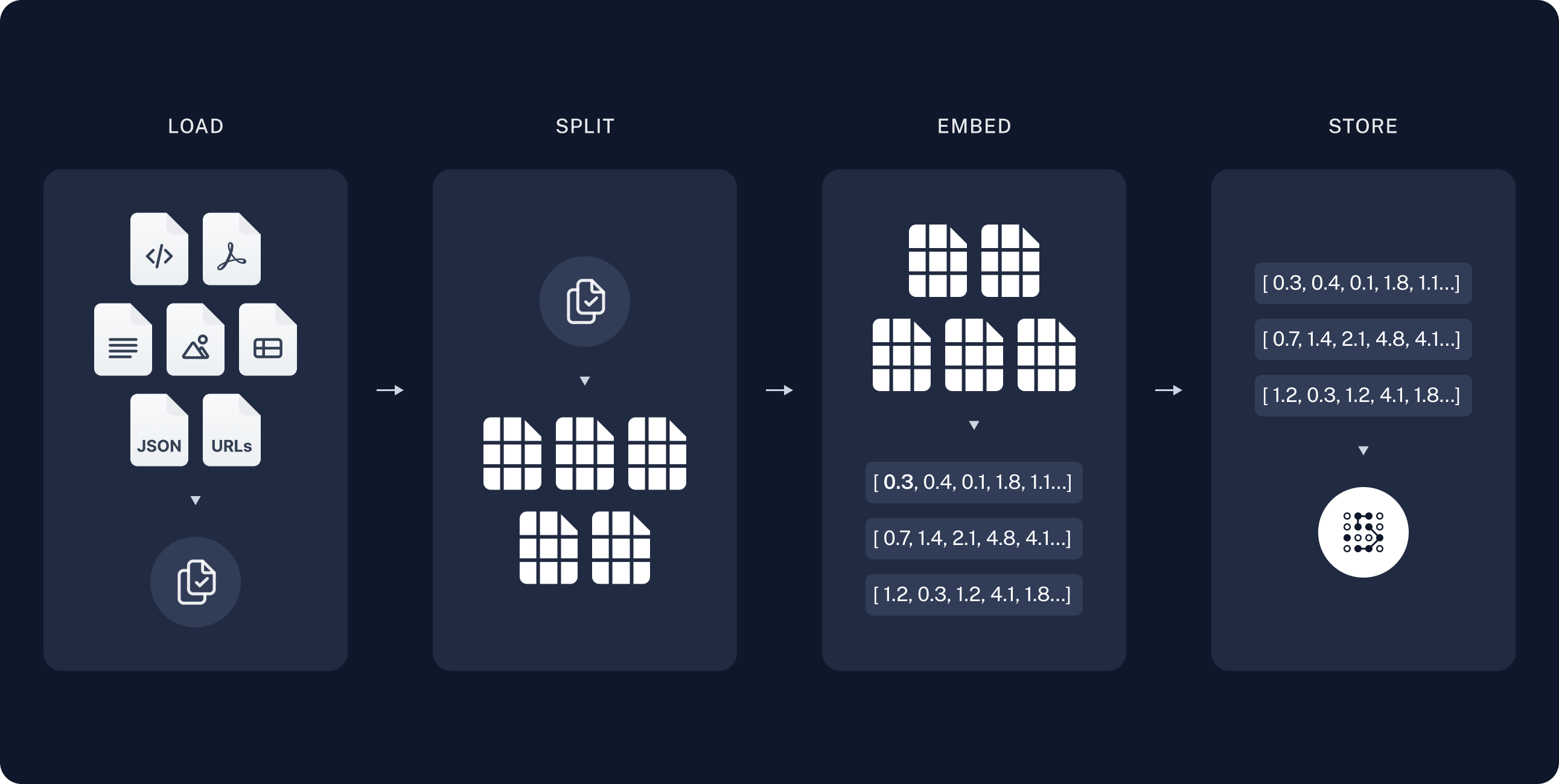
Loading documents
We need to first load the blog post contents. We can use DocumentLoaders for this, which are objects that load in data from a source and return a list of Document objects.
In this case we’ll use the WebBaseLoader, which uses urllib to load HTML from web URLs and BeautifulSoup to parse it to text. We can customize the HTML -> text parsing by passing in parameters into the BeautifulSoup parser via bs_kwargs (see BeautifulSoup docs). In this case only HTML tags with class “post-content”, “post-title”, or “post-header” are relevant, so we’ll remove all others.
import bs4
from langchain_community.document_loaders import WebBaseLoader

# Only keep post title, headers, and content from the full HTML.
bs4_strainer = bs4.SoupStrainer(class_=("post-title", "post-header", "post-content"))
loader = WebBaseLoader(
    web_paths=("https://lilianweng.github.io/posts/2023-06-23-agent/",),
    bs_kwargs={"parse_only": bs4_strainer},
)
docs = loader.load()

assert len(docs) == 1
print(f"Total characters: {len(docs[0].page_content)}")
USER_AGENT environment variable not set, consider setting it to identify your requests.
Total characters: 43047print(docs[0].page_content[:500])
      LLM Powered Autonomous Agents

Date: June 23, 2023  |  Estimated Reading Time: 31 min  |  Author: Lilian Weng


Building agents with LLM (large language model) as its core controller is a cool concept. Several proof-of-concepts demos, such as AutoGPT, GPT-Engineer and BabyAGI, serve as inspiring examples. The potentiality of LLM extends beyond generating well-written copies, stories, essays and programs; it can be framed as a powerful general problem solver.
Agent System Overview#
In
Go deeper
DocumentLoader: Object that loads data from a source as list of Documents.
- Integrations: 160+ integrations to choose from.
BaseLoader: API reference for the base interface.
Splitting documents
Our loaded document is over 42k characters which is too long to fit into the context window of many models. Even for those models that could fit the full post in their context window, models can struggle to find information in very long inputs.
To handle this we’ll split the Document into chunks for embedding and vector storage. This should help us retrieve only the most relevant parts of the blog post at run time.
As in the semantic search tutorial, we use a RecursiveCharacterTextSplitter, which will recursively split the document using common separators like new lines until each chunk is the appropriate size. This is the recommended text splitter for generic text use cases.
from langchain_text_splitters import RecursiveCharacterTextSplitter

text_splitter = RecursiveCharacterTextSplitter(
    chunk_size=1000,  # chunk size (characters)
    chunk_overlap=200,  # chunk overlap (characters)
    add_start_index=True,  # track index in original document
)
all_splits = text_splitter.split_documents(docs)

print(f"Split blog post into {len(all_splits)} sub-documents.")
Split blog post into 63 sub-documents.Go deeper
TextSplitter: Object that splits a list of Document objects into smaller chunks for storage and retrieval.
- Integrations
- Interface: API reference for the base interface.
Storing documents
Now we need to index our 66 text chunks so that we can search over them at runtime. Following the semantic search tutorial, our approach is to embed the contents of each document split and insert these embeddings into a vector store. Given an input query, we can then use vector search to retrieve relevant documents.
We can embed and store all of our document splits in a single command using the vector store and embeddings model selected at the start of the tutorial.
document_ids = vector_store.add_documents(documents=all_splits)

print(document_ids[:3])
['bf22b9d9-98a8-4d96-805a-16ba32726bf6', '12d6b8e4-cac4-4171-b8c3-670300580a45', '96efbfe6-8e4e-4e6d-8af6-e9ef8021a70f']Go deeper
Embeddings: Wrapper around a text embedding model, used for converting text to embeddings.
- Integrations: 30+ integrations to choose from.
- Interface: API reference for the base interface.
VectorStore: Wrapper around a vector database, used for storing and querying embeddings.
- Integrations: 40+ integrations to choose from.
- Interface: API reference for the base interface.
This completes the Indexing portion of the pipeline. At this point we have a query-able vector store containing the chunked contents of our blog post. Given a user question, we should ideally be able to return the snippets of the blog post that answer the question.
2. Retrieval and generation
RAG applications commonly work as follows:
- Retrieve: Given a user input, relevant splits are retrieved from storage using a Retriever.
- Generate: A model produces an answer using a prompt that includes both the question with the retrieved data
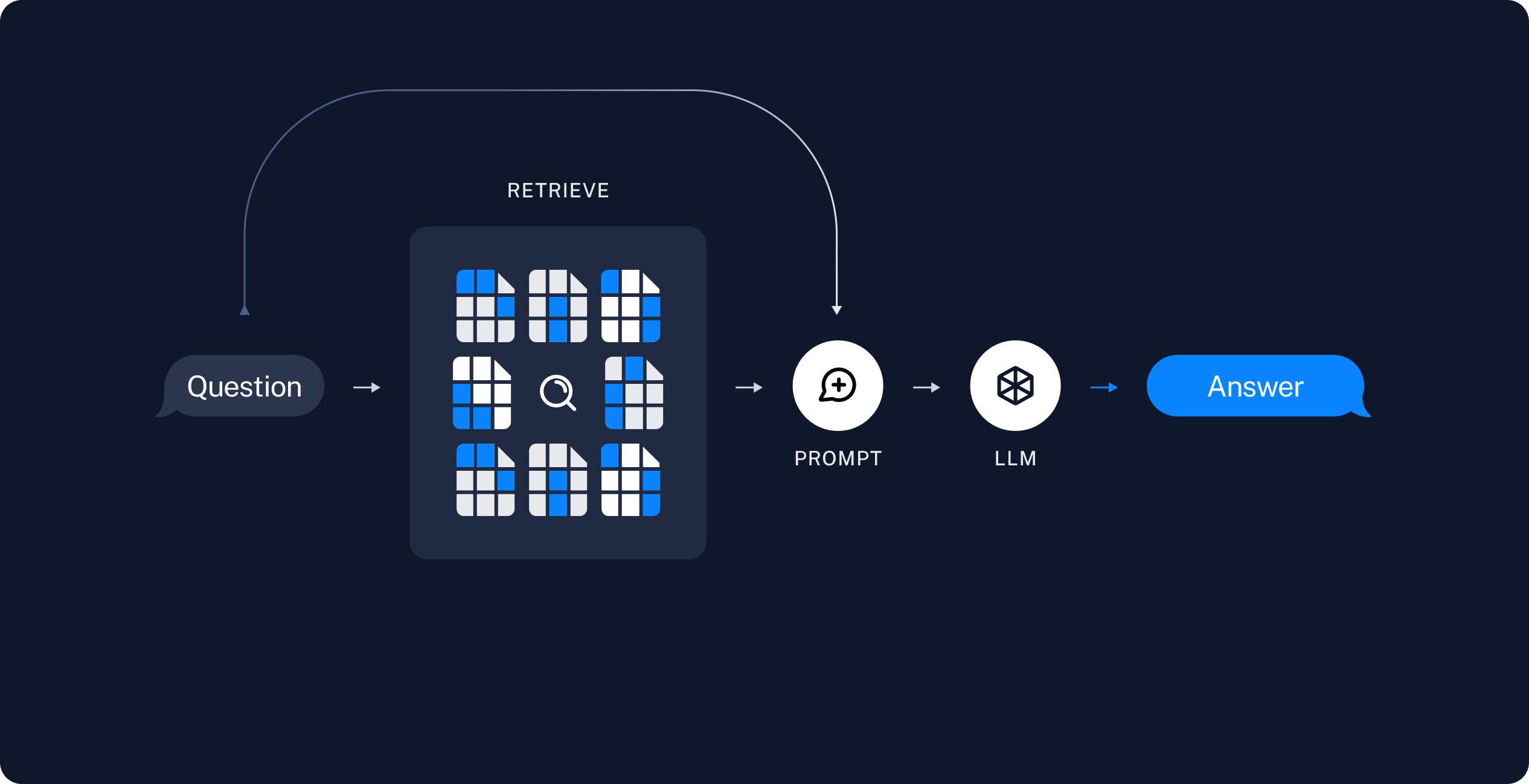
Now let’s write the actual application logic. We want to create a simple application that takes a user question, searches for documents relevant to that question, passes the retrieved documents and initial question to a model, and returns an answer.
We will demonstrate:
- A two-step RAG chain that uses just a single LLM call per query. This is a fast and effective method for simple queries.
- A RAG agent that executes searches with a simple tool. This is a good general-purpose implementation.
1. RAG chains
In this approach we no longer call the model in a loop, but instead make a single pass, in a two-step chain:
- run a search (potentially using the raw user query) and
- incorporate the result as context for a single LLM query.
This results in a single inference call per query, buying reduced latency at the expense of flexibility.
We can implement this chain by removing tools from the agent and instead incorporating the retrieval step into a custom prompt:
from langchain.messages import HumanMessage, SystemMessage

def retrieve_context(query: str):
    """Retrieve information to help answer a query."""
    retrieved_docs = vector_store.similarity_search(query, k=2)
    serialized = "\n\n".join(
        (f"Source: {doc.metadata}\n"
        f"Content: {doc.page_content}")
        for doc in retrieved_docs
    )
    return serialized


def rag_chain(query: str):
    """Inject context into prompt and return the LLM response."""
    prompt = (
        "You are a helpful assistant. Use the following context in your response:"
        "\n\n{context}"
    )
    context = retrieve_context(query)
    return model_nemotron3_nano.invoke([
        SystemMessage(prompt.format(context=context)),
        HumanMessage(query)
    ])
ai_message = rag_chain("What is task decomposition?")ai_message.pretty_print()================================== Ai Message ==================================
**Task decomposition** is the process of breaking a complex, high‑level goal into a series of smaller, more manageable sub‑tasks or steps that can be tackled individually.
In the context you provided, task decomposition can be achieved in three main ways:
1. **LLM‑driven prompting** – asking the language model to generate the steps itself, e.g., “Steps for XYZ \n1.” or “What are the subgoals for achieving XYZ?”
2. **Task‑specific instructions** – giving the model a prompt that implicitly defines the decomposition, such as “Write a story outline” for novel writing.
3. **Human input** – having a person explicitly outline the sub‑tasks that need to be completed.
These approaches turn a single, difficult problem into a sequence of simpler problems, making planning and execution easier for the agent. (The context also links this idea to techniques like Chain‑of‑Thought and Tree‑of‑Thought, which further expand on how the decomposition can be explored and refined.)
In the LangSmith trace we can see the retrieved context incorporated into the model prompt.
This is a fast and effective method for simple queries in constrained settings, when we typically do want to run user queries through semantic search to pull additional context.
2. RAG agents
One formulation of a RAG application is as a simple agent with a tool that retrieves information. We can assemble a minimal RAG agent by implementing a tool that wraps our vector store:
from typing import Literal
from langchain.tools import tool

@tool(response_format="content_and_artifact")
def retrieve_context_2(
    query: str,
    # section can help the Agent decide where it
    # wants to focus its attention
    # no need to actually use the value
    section: Literal["beginning", "middle", "end"]
):
    """Retrieve information to help answer a query."""
    retrieved_docs = vector_store.similarity_search(query, k=2)
    serialized = "\n\n".join(
        (f"Source: {doc.metadata}\n"
        f"Content: {doc.page_content}")
        for doc in retrieved_docs
    )
    content, artifact = serialized, retrieved_docs
    return content, artifact
Tip
Here we use the tool decorator to configure the tool to attach raw documents as artifacts to each ToolMessage. This will let us access document metadata in our application, separate from the stringified representation that is sent to the model.
Given our tool, we can construct the agent:
from langchain.agents import create_agent


agent = create_agent(
    model=model_nemotron3_nano,
    tools=[retrieve_context],
    # System prompt is optional
    system_prompt=(
        "You have access to a tool that retrieves context from a blog post. "
        "Use the tool to help answer user queries."
    )
)
Let’s test this out. We construct a question that would typically require an iterative sequence of retrieval steps to answer:
query = (
    "What is the standard method for Task Decomposition?\n\n"
    "Once you get the answer, look up common extensions of that method."
)
result = agent.invoke({"messages": [HumanMessage(query)]})
for msg in result["messages"]:
msg.pretty_print()================================ Human Message ================================= What is the standard method for Task Decomposition? Once you get the answer, look up common extensions of that method. ================================== Ai Message ================================== Tool Calls: retrieve_context (call_dab7dc1511da437d8a012a58) Call ID: call_dab7dc1511da437d8a012a58 Args: query: standard method for Task Decomposition ================================= Tool Message ================================= Name: retrieve_context Source: {'source': 'https://lilianweng.github.io/posts/2023-06-23-agent/', 'start_index': 2578} Content: Task decomposition can be done (1) by LLM with simple prompting like "Steps for XYZ.\n1.", "What are the subgoals for achieving XYZ?", (2) by using task-specific instructions; e.g. "Write a story outline." for writing a novel, or (3) with human inputs. Another quite distinct approach, LLM+P (Liu et al. 2023), involves relying on an external classical planner to do long-horizon planning. This approach utilizes the Planning Domain Definition Language (PDDL) as an intermediate interface to describe the planning problem. In this process, LLM (1) translates the problem into “Problem PDDL”, then (2) requests a classical planner to generate a PDDL plan based on an existing “Domain PDDL”, and finally (3) translates the PDDL plan back into natural language. Essentially, the planning step is outsourced to an external tool, assuming the availability of domain-specific PDDL and a suitable planner which is common in certain robotic setups but not in many other domains. Self-Reflection# Source: {'source': 'https://lilianweng.github.io/posts/2023-06-23-agent/', 'start_index': 1638} Content: Component One: Planning# A complicated task usually involves many steps. An agent needs to know what they are and plan ahead. Task Decomposition# Chain of thought (CoT; Wei et al. 2022) has become a standard prompting technique for enhancing model performance on complex tasks. The model is instructed to “think step by step” to utilize more test-time computation to decompose hard tasks into smaller and simpler steps. CoT transforms big tasks into multiple manageable tasks and shed lights into an interpretation of the model’s thinking process. Tree of Thoughts (Yao et al. 2023) extends CoT by exploring multiple reasoning possibilities at each step. It first decomposes the problem into multiple thought steps and generates multiple thoughts per step, creating a tree structure. The search process can be BFS (breadth-first search) or DFS (depth-first search) with each state evaluated by a classifier (via a prompt) or majority vote. ================================== Ai Message ================================== Tool Calls: retrieve_context (call_2a536cf78cac44c3902e9cf1) Call ID: call_2a536cf78cac44c3902e9cf1 Args: query: extensions of chain of thought task decomposition ================================= Tool Message ================================= Name: retrieve_context Source: {'source': 'https://lilianweng.github.io/posts/2023-06-23-agent/', 'start_index': 1638} Content: Component One: Planning# A complicated task usually involves many steps. An agent needs to know what they are and plan ahead. Task Decomposition# Chain of thought (CoT; Wei et al. 2022) has become a standard prompting technique for enhancing model performance on complex tasks. The model is instructed to “think step by step” to utilize more test-time computation to decompose hard tasks into smaller and simpler steps. CoT transforms big tasks into multiple manageable tasks and shed lights into an interpretation of the model’s thinking process. Tree of Thoughts (Yao et al. 2023) extends CoT by exploring multiple reasoning possibilities at each step. It first decomposes the problem into multiple thought steps and generates multiple thoughts per step, creating a tree structure. The search process can be BFS (breadth-first search) or DFS (depth-first search) with each state evaluated by a classifier (via a prompt) or majority vote. Source: {'source': 'https://lilianweng.github.io/posts/2023-06-23-agent/', 'start_index': 2578} Content: Task decomposition can be done (1) by LLM with simple prompting like "Steps for XYZ.\n1.", "What are the subgoals for achieving XYZ?", (2) by using task-specific instructions; e.g. "Write a story outline." for writing a novel, or (3) with human inputs. Another quite distinct approach, LLM+P (Liu et al. 2023), involves relying on an external classical planner to do long-horizon planning. This approach utilizes the Planning Domain Definition Language (PDDL) as an intermediate interface to describe the planning problem. In this process, LLM (1) translates the problem into “Problem PDDL”, then (2) requests a classical planner to generate a PDDL plan based on an existing “Domain PDDL”, and finally (3) translates the PDDL plan back into natural language. Essentially, the planning step is outsourced to an external tool, assuming the availability of domain-specific PDDL and a suitable planner which is common in certain robotic setups but not in many other domains. Self-Reflection# ================================== Ai Message ================================== **Standard method:** The most widely‑cited “standard” approach for task decomposition in LLM prompting is **Chain‑of‑Thought (CoT) prompting** (Wei et al., 2022). In CoT the model is explicitly asked to *“think step‑by‑step”*; this forces it to break a complex problem into a series of smaller, easier sub‑goals or reasoning steps before arriving at a final answer. **Common extensions of CoT:** The literature quickly built on this idea with several related extensions, the most prominent of which—according to the source you retrieved—is **Tree‑of‑Thoughts** (Yao et al., 2023). Tree‑of‑Thoughts: * Still starts from a step‑wise decomposition (like CoT) but goes further by **generating multiple possible thoughts at each step**, creating a branching tree of reasoning paths. * Explores these paths with search strategies such as **breadth‑first search (BFS)** or **depth‑first search (DFS)**, and evaluates each state either with a separate classifier prompt or by majority vote. * Allows the model to backtrack, prune, or select the most promising branch, thereby handling more complex, multi‑step reasoning tasks than a linear chain. Other frequently cited extensions (though not explicitly detailed in the retrieved snippet) include **Self‑Consistency** (Wang et al., 2023), **Least‑to‑Most prompting**, and **Program‑of‑Thought** approaches, all of which build on the same basic idea of decomposing a problem into intermediate reasoning steps and then stitching them together. So, the canonical technique is Chain‑of‑Thought, and its most common scholarly extension is the Tree‑of‑Thoughts framework.
Note that the agent:
- Generates a query to search for a standard method for task decomposition;
- Receiving the answer, generates a second query to search for common extensions of it;
- Having received all necessary context, answers the question.
We can see the full sequence of steps, along with latency and other metadata, in the LangSmith trace.
Tip
You can add a deeper level of control and customization using the LangGraph framework directly— for example, you can add steps to grade document relevance and rewrite search queries. Check out LangGraph’s Agentic RAG tutorial for more advanced formulations.
Agent vs Chain
In the above agentic RAG formulation we allow the LLM to use its discretion in generating a tool call to help answer user queries. This is a good general-purpose solution, but comes with some trade-offs:
✅ Benefits
- Search only when needed – The LLM can handle greetings, follow-ups, and simple queries without triggering unnecessary searches.
- Contextual search queries – By treating search as a tool with a query input, the LLM crafts its own queries that incorporate conversational context.
- Multiple searches allowed – The LLM can execute several searches in support of a single user query.
⚠️ Drawbacks
- Two inference calls – When a search is performed, it requires one call to generate the query and another to produce the final response.
- Reduced control – The LLM may skip searches when they are actually needed, or issue extra searches when unnecessary.
Key Takeaways
- RAG (Retrieval Augmented Generation) combines retrieval from your data with an LLM to answer questions over specific source information.
- Indexing vs. retrieval – Indexing (ingesting and embedding data into a vector store) is usually a separate, offline step; retrieval and generation happen at query time.
- RAG chain – Single LLM call per query: retrieve docs → pass to model → answer. Fast and simple for straightforward questions.
- RAG agent – Uses a search tool so the LLM decides when and how to search. Better for multi-step or nuanced queries (e.g., multiple searches, contextual query rewriting).
- Agent trade-offs – Agents can skip unnecessary searches and issue multiple or contextual queries, but add an extra inference call when they do search and give you less direct control than a fixed chain.